All use cases
Product Mix Shift · Predictive · about to happen
  1. 01How it is found
  2. 02What you see
  3. 03What you do next
  4. 04The money
  5. 05In both engines' views
  6. 06On from the start

No cost changed. The margin fell anyway.

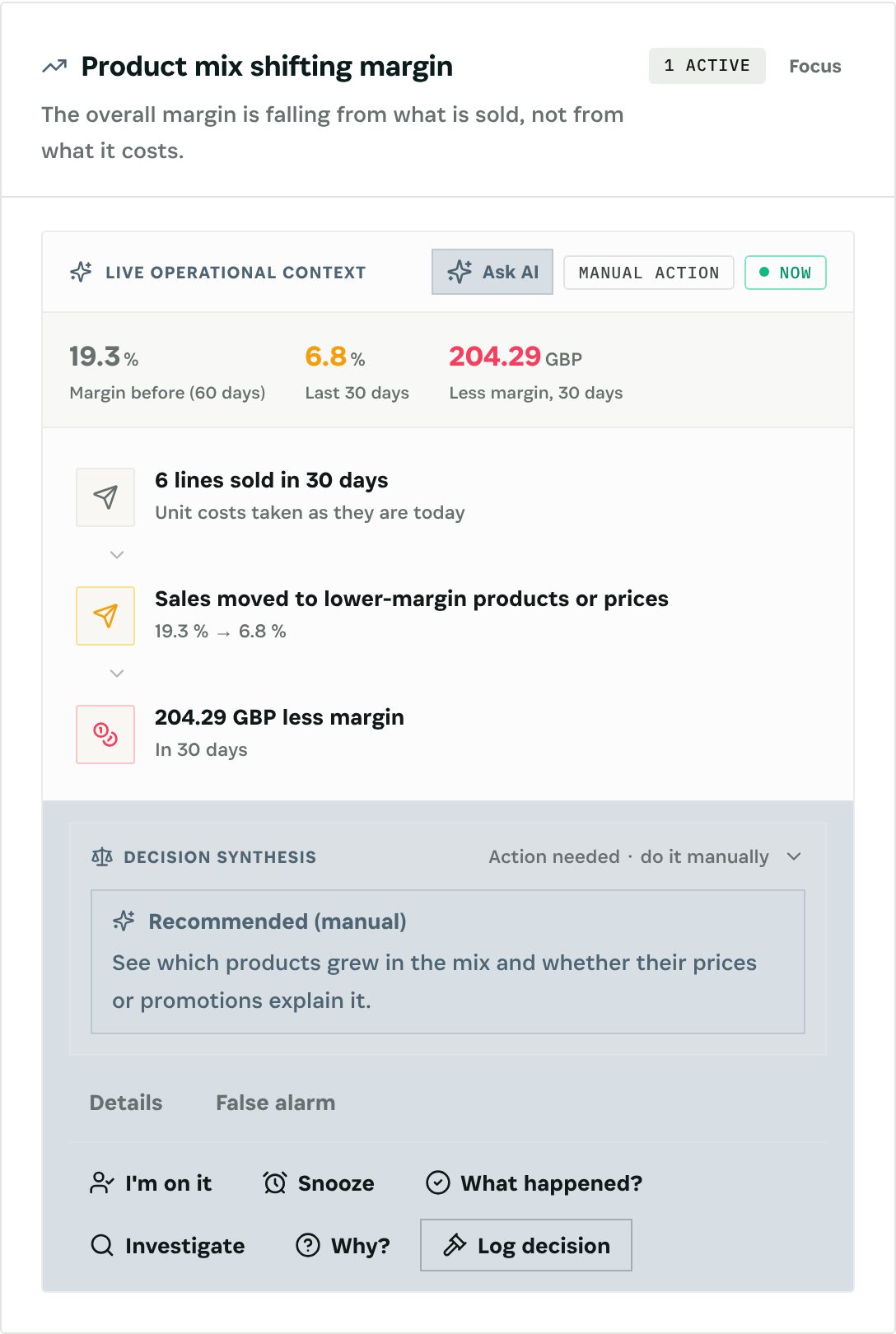
The overall margin is falling from what is sold, not from what it costs. Otiox compares the margin of the last 30 days with the 60 before at the same unit costs, so a shift in the mix or in prices shows on its own.
app.otiox.comFig. 00
Predictive · margin
Margin 19.3 % → 3.4 %
From what is sold, not what it costs
SignalMeasuredValue
Margin before60 days19.3 %
Last 30 dayssame unit costs3.4 %
Orderseach window≥ 10
Less margin, 30 days: $420
What to do

See which products grew in the mix and whether prices or promotions explain it.

The mix is a decision, not a surprise.

01The Challenge

Every product's margin is fine. The total isn't.

For example: the margin was 19.3 % over the previous 60 days and 3.4 % in the last 30, with the same unit costs. Sales moved to the cheaper line, or prices slipped.
  1. 01
    Product margins look stable
  2. 02
    The total margin falls
  3. 03
    Cost is blamed first
  4. 04
    Mix and price are never separated
02SEE IT IN OTIOX

The same situation, in the product.

Real screens from the Otiox demo workspace, step by step.
  1. 01

    The forecast, with its cascade

    The Predictive Engine's card shows the numbers behind the warning, the cascade from the record to the money and the recommended action. See which products grew in the mix and whether prices or promotions explain it.

    The forecast, with its cascade
  2. 02

    On, shadow or off

    The scenario's row on the Scenario switches page: how many findings are open, and its switch. It is on from the start; shadow keeps it counting without raising findings.

    On, shadow or off
03

How It Works

Purpose-built features that solve these exact problems.
01

How it is found

Margin on order lines in the last 30 days vs the 60 before, at the same unit costs, with at least 10 orders in each window. Lines without a cost are left out (at most a fifth of them). It fires when the margin falls by 3 points or more.
02

What you see

The Risk Inbox line "Margin fell from 19.3 % to 3.4 % from what is sold", in the Predictive Engine.
03

What you do next

See which products grew in the mix and whether prices or promotions explain it.
04

The money

Revenue of the last 30 days times the margin points lost.
05

In both engines' views

The finding appears in the Predictive Engine with its cascade from the record to the money, in the Risk Inbox and in the Loss Prevention Report.
06

On from the start

The scenario is on by default. Put it in shadow to keep it counting on the margin scenarios screen, with a six-month backtest, without raising findings, or switch it off.
04

What You'll Gain

Tangible improvements that impact your bottom line.
  1. 01
    Mix separated from cost

    Same unit costs in both windows.

  2. 02
    The size of it

    The margin lost in money over 30 days.

  3. 03
    Counted with every other loss

    Margin findings feed the Loss Prevention Report next to the other engine findings.

  4. 04
    Nothing changes by itself

    No scenario changes a price, a discount or an order. You decide.

05

Real-World Scenarios

See how this works in practice.
Scenario 1

The mix moved

Sales shift to a lower-margin product line.
Scenario 2

Warned

The finding shows the margin from 19.3 % to 3.4 % at unchanged costs.
Scenario 3

Fixed

The promotion pushing the cheap line is ended.
06

The Transformation

From chaos to clarity.
Before
  • Total margin falls
  • Cost blamed
  • Mix ignored
  • Promotions unexamined
After
  • Margin at unchanged costs
  • Mix effect isolated
  • Lost margin in money
  • Promotions reviewed
07

Frequently Asked Questions

Quick answers to common questions.
01Why the same unit costs?
So the change shows what is sold and at what price, not what it costs.
02What about lines without a cost?
They are left out, as long as they are at most a fifth of all lines; otherwise the check does not run.
03Who sees the numbers?
Cost and margin figures are shown only to people with cost or accounting rights.
04Does Otiox change prices or orders?
No. No scenario changes a price, a discount or an order. It raises the finding and opens the record; the decision is yours.
05Can I put it in shadow or switch it off?
Yes. Every scenario is on from the start. Per scenario, you can put it in shadow (it keeps counting on the margin scenarios screen, with a six-month backtest, but raises nothing) or switch it off, on the margin card or the Scenario switches page. Thresholds are workspace settings.
06Which currency are the amounts in?
Your books currency, at the store's own rate. With no rate, the amount is left empty, never guessed. VAT is taken out before margins; test, cancelled, refunded, draft and abandoned orders are left out.
Product Mix Shift

Ready to transform your product mix shift?

See how Otiox can solve your specific challenges.
