All use cases
Orders Losing Money After Shipping · Predictive · about to happen
  1. 01How it is found
  2. 02What you see
  3. 03What you do next
  4. 04The money
  5. 05In both engines' views
  6. 06On from the start

Profitable until the carrier was paid.

The order makes money on the goods and loses it on shipping. Otiox counts the real carrier cost, or the usual cost for the country labelled as an estimate, and shows every order that turns negative after shipping.
app.otiox.comFig. 00
Predictive · margin
Order loses $2.10 after shipping
Order · carrier cost recorded
SignalMeasuredValue
Margin on goodsbefore shipping$9.00
Shipping charged$4.90
Carrier costrecorded$16.00
True margin: −$2.10
What to do

Charge shipping, raise the free-shipping threshold or check the carrier rate.

Orders like it end positive after shipping.

01The Challenge

The margin report stops before the carrier.

For example: a $30 order with $9 of margin on the goods, $4.90 charged for shipping and a $16 carrier cost. It loses $2.10. Margin reports show the goods; the carrier bill is somewhere else.
  1. 01
    Margin is reported before shipping
  2. 02
    Carrier costs arrive separately
  3. 03
    Heavy, cheap orders lose money
  4. 04
    Nobody sees it per order
02SEE IT IN OTIOX

The same situation, in the product.

Real screens from the Otiox demo workspace, step by step.
  1. 01

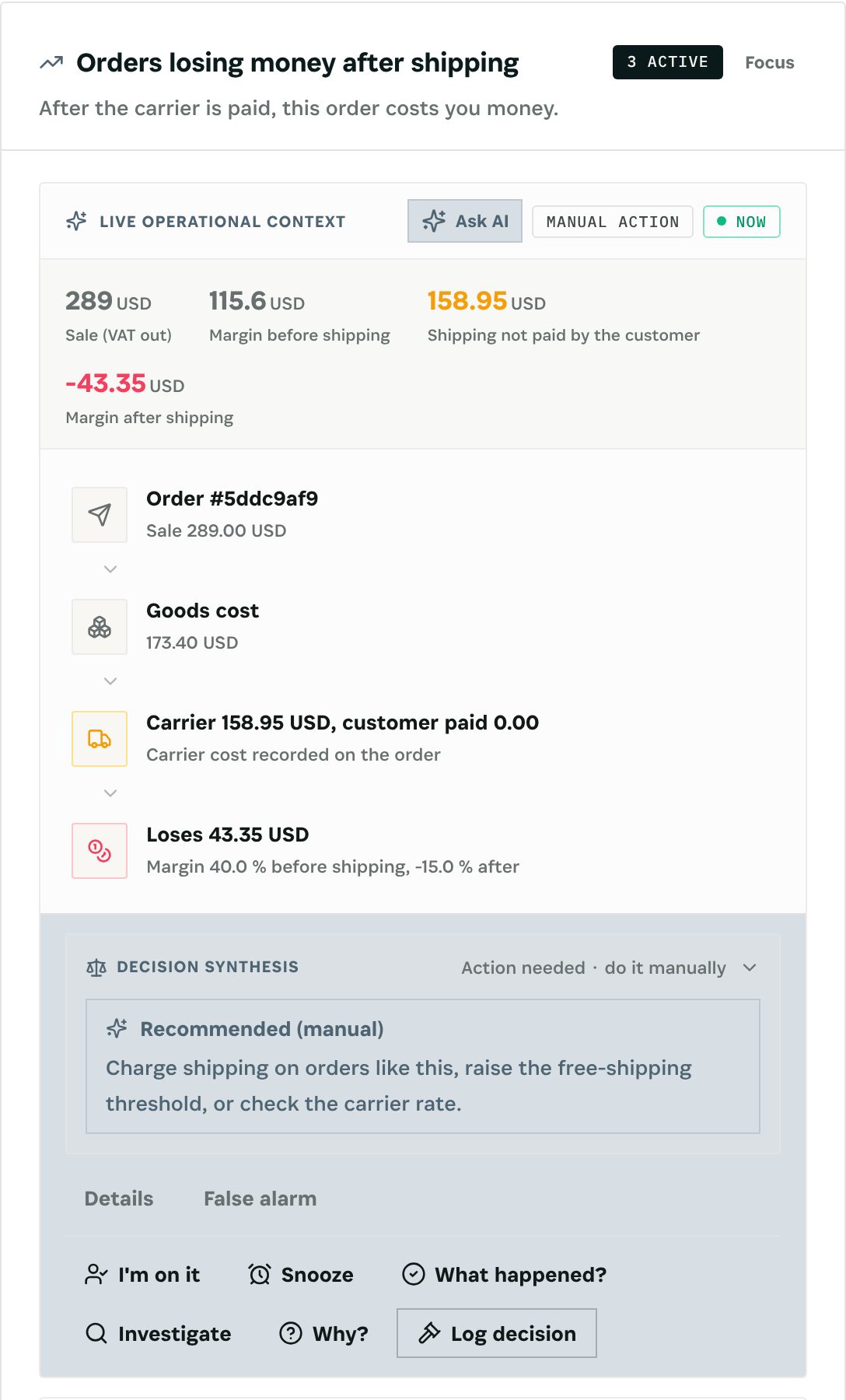
    The forecast, with its cascade

    The Predictive Engine's card shows the numbers behind the warning, the cascade from the record to the money and the recommended action. Charge shipping, raise the free-shipping threshold, or check the carrier rate.

    The forecast, with its cascade
  2. 02

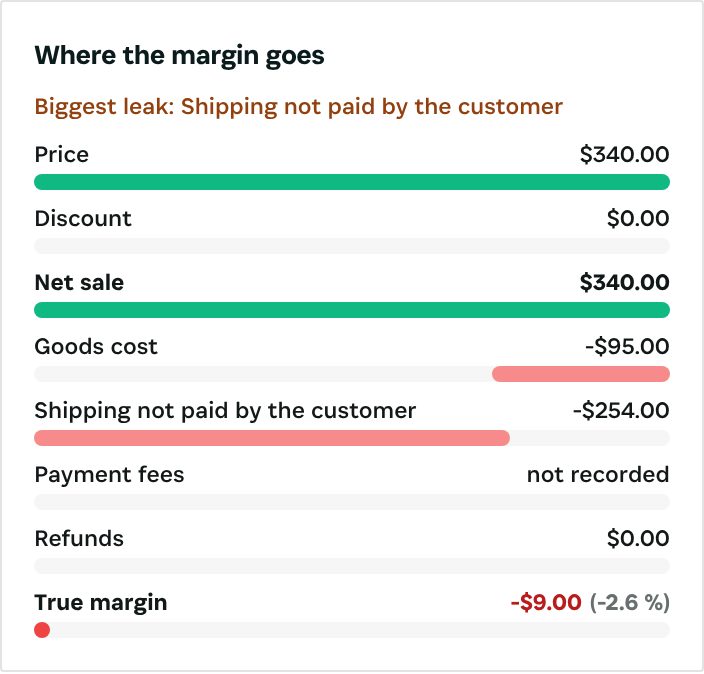
    Where the margin goes

    On the order, the waterfall runs from price through discount, goods cost, shipping not paid by the customer, payment fees and refunds to the true margin, and names the biggest leak.

    Where the margin goes
  3. 03

    On, shadow or off

    The scenario's row on the Scenario switches page: how many findings are open, and its switch. It is on from the start; shadow keeps it counting without raising findings.

    On, shadow or off
03

How It Works

Purpose-built features that solve these exact problems.
01

How it is found

Orders of the last 30 days whose margin is positive before shipping and negative after, once the carrier cost is counted. With no carrier cost recorded, the store's usual cost for that country is used and labelled estimate, at a lower severity.
02

What you see

The Risk Inbox line "Order {n} loses $2.10 after shipping" with an Open order button; the order's margin waterfall ends in a negative true margin. The backtest counts findings on a real carrier charge vs an estimate.
03

What you do next

Charge shipping, raise the free-shipping threshold, or check the carrier rate.
04

The money

The loss after shipping.
05

In both engines' views

The finding appears in the Predictive Engine with its cascade from the record to the money, in the Risk Inbox and in the Loss Prevention Report.
06

On from the start

The scenario is on by default. Put it in shadow to keep it counting on the margin scenarios screen, with a six-month backtest, without raising findings, or switch it off.
04

What You'll Gain

Tangible improvements that impact your bottom line.
  1. 01
    True order margin

    Price, discount, goods, shipping, fees and refunds in one waterfall.

  2. 02
    Estimates labelled

    An estimated carrier cost is always marked as one.

  3. 03
    Counted with every other loss

    Margin findings feed the Loss Prevention Report next to the other engine findings.

  4. 04
    Nothing changes by itself

    No scenario changes a price, a discount or an order. You decide.

05

Real-World Scenarios

See how this works in practice.
Scenario 1

Heavy and cheap

A $30 order: $9 margin on the goods, $4.90 shipping charged, $16 carrier cost.
Scenario 2

Flagged

The finding shows the order losing $2.10 after shipping.
Scenario 3

Fixed

The shipping price for that zone is raised.
06

The Transformation

From chaos to clarity.
Before
  • Margin before shipping only
  • Carrier bills elsewhere
  • Losing orders unseen
  • No per-order view
After
  • Margin after the carrier
  • Real cost or labelled estimate
  • Losing orders listed
  • Shipping priced right
07

Frequently Asked Questions

Quick answers to common questions.
01What if no carrier cost is recorded?
The usual carrier cost for that country is used, labelled estimate, and the finding gets a lower severity.
02What does the waterfall show?
Price → discount → net sale → goods cost → shipping not paid by the customer → payment fees → refunds → true margin, with the biggest leak named.
03Who sees the numbers?
Cost and margin figures are shown only to people with cost or accounting rights.
04Does Otiox change prices or orders?
No. No scenario changes a price, a discount or an order. It raises the finding and opens the record; the decision is yours.
05Can I put it in shadow or switch it off?
Yes. Every scenario is on from the start. Per scenario, you can put it in shadow (it keeps counting on the margin scenarios screen, with a six-month backtest, but raises nothing) or switch it off, on the margin card or the Scenario switches page. Thresholds are workspace settings.
06Which currency are the amounts in?
Your books currency, at the store's own rate. With no rate, the amount is left empty, never guessed. VAT is taken out before margins; test, cancelled, refunded, draft and abandoned orders are left out.
Orders Losing Money After Shipping

Ready to transform your orders losing money after shipping?

See how Otiox can solve your specific challenges.