All use cases
Receipt Cost Broke the Margin · Integrity · already happened
  1. 01How it is found
  2. 02What you see
  3. 03What you do next
  4. 04The money
  5. 05In both engines' views
  6. 06On from the start

The delivery cost more. Twelve open orders will ship at that cost.

A new receipt comes in dearer and nobody tells sales. Otiox checks every purchase receipt against the product's target margin, warns in the receiving dialog before the goods are booked in, and raises a finding with the margin before and after.
app.otiox.comFig. 00
Integrity · margin
New cost broke the margin of 1 product
Receipt · before booking in
SignalMeasuredValue
Unit costwas $30.00$37.00
Margintarget 10 %25 % → 7.5 %
Open orderswill ship at this cost12 · 30 units
Exposure on open orders: $210
What to do

Check the supplier price and the unit, then review the selling price.

The margin is back above target; the finding clears on the next scan.

01The Challenge

Purchasing saw the new price. Sales never did.

For example: a product sells for $40 and used to cost $30, a 25 % margin. The new receipt costs $37 a unit: the margin is now 7.5 %, under the 10 % floor, and twelve open orders will ship at that cost. The receipt is booked like any other, and the drop shows up weeks later as a weaker month.
  1. 01
    A dearer receipt looks like any other receipt
  2. 02
    Open orders keep the old price and ship at the new cost
  3. 03
    Nobody compares the new unit cost with the selling price
  4. 04
    The drop surfaces in the monthly total, not on the product
02SEE IT IN OTIOX

The same situation, in the product.

Real screens from the Otiox demo workspace, step by step.
  1. 01

    The finding, and how it happened

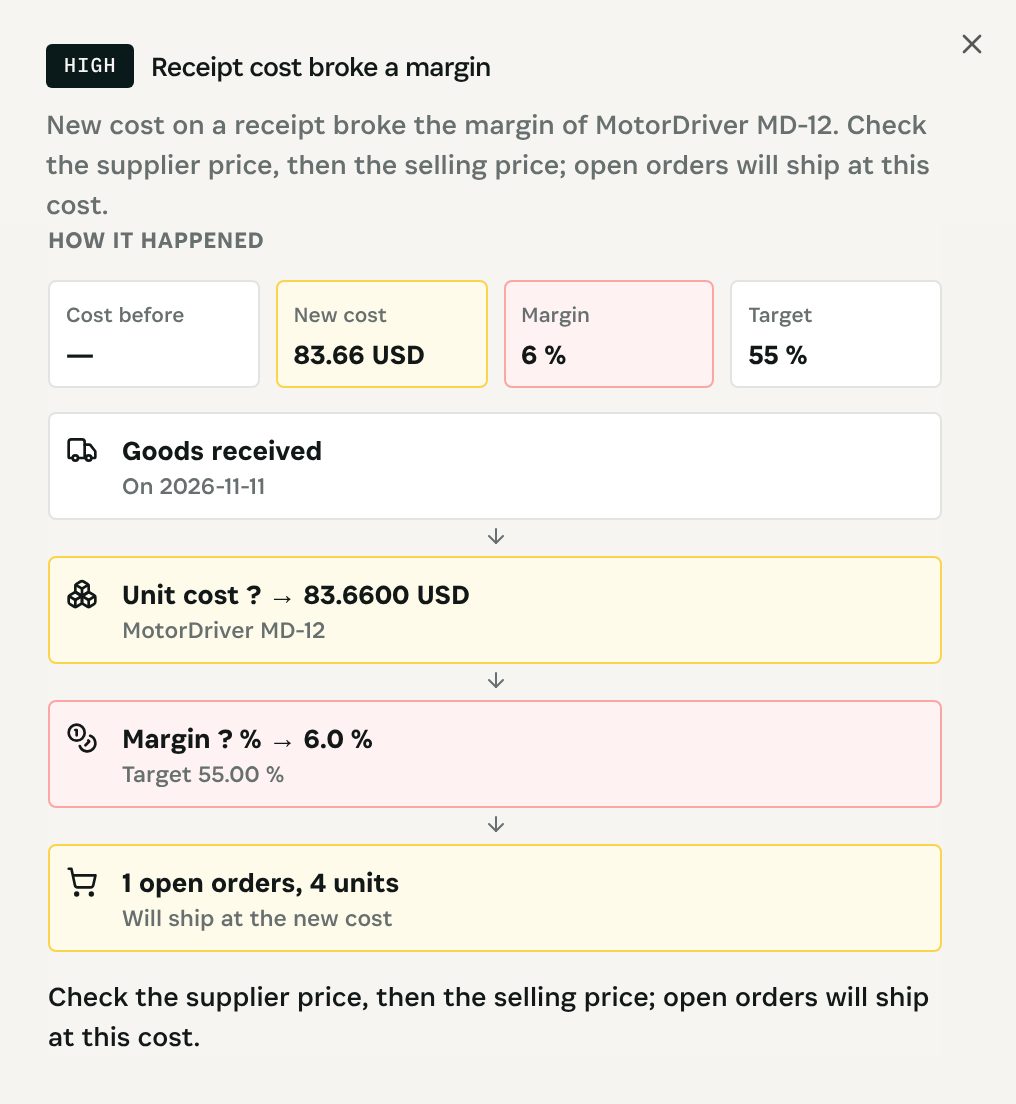
    The Integrity Engine's finding names the record and what to do, and its cascade shows how it reached the money. Check the supplier price and the unit first (a wrong unit is a pack-size mix-up), then review the selling price. Open orders keep their price. The warning never blocks the receipt.

    The finding, and how it happened
  2. 02

    On, shadow or off

    The scenario's row on the Scenario switches page: how many findings are open, and its switch. It is on from the start; shadow keeps it counting without raising findings.

    On, shadow or off
03

How It Works

Purpose-built features that solve these exact problems.
01

How it is found

Each purchase receipt of the last 30 days. It fires when the new unit cost puts the margin under the product's own target margin (else the lowest acceptable margin, 10 % by default), and either the margin was above it before or it dropped by 10 points or more. Critical when the cost reaches the price.
02

What you see

A red warning in the receiving dialog, before booking in: margin now → new, the target, and the open orders and units that will ship at this cost. After booking, the Risk Inbox line "New cost on a receipt broke the margin of {product}: 25 % → 7.5 %" with an Open product button.
03

What you do next

Check the supplier price and the unit first (a wrong unit is a pack-size mix-up), then review the selling price. Open orders keep their price. The warning never blocks the receipt.
04

The money

The cost increase times the units on open orders: what the dearer stock will cost you on orders already taken.
05

In both engines' views

The finding appears in the Integrity Engine with its cascade from the record to the money, in the Risk Inbox and in the Loss Prevention Report.
06

On from the start

The scenario is on by default. Put it in shadow to keep it counting on the margin scenarios screen, with a six-month backtest, without raising findings, or switch it off.
04

What You'll Gain

Tangible improvements that impact your bottom line.
  1. 01
    Seen before booking

    The warning is in the receiving dialog, while the goods can still be questioned.

  2. 02
    Open orders counted

    You see how many orders and units will ship at the new cost.

  3. 03
    Counted with every other loss

    Margin findings feed the Loss Prevention Report next to the other engine findings.

  4. 04
    Nothing changes by itself

    No scenario changes a price, a discount or an order. You decide.

05

Real-World Scenarios

See how this works in practice.
Scenario 1

A dearer delivery

A receipt books a product at $37 instead of $30; it sells for $40.
Scenario 2

Warned at receiving

The dialog shows margin 25 % → 7.5 % (target 10 %) and 12 open orders, 30 units.
Scenario 3

Fixed

The supplier price is checked, the selling price raised for new orders; the finding clears on the next scan.
06

The Transformation

From chaos to clarity.
Before
  • Dearer receipts booked silently
  • Sales sells at the old cost
  • Open orders ship at a loss
  • Found in the monthly total
After
  • Margin checked on every receipt
  • Warning before booking in
  • Open orders and units counted
  • Repriced the same day
07

Frequently Asked Questions

Quick answers to common questions.
01Does the warning stop the receipt?
No. It warns and lists the products, the margin before and after and the open orders affected. You can still book the goods in.
02Which margin target is used?
The product's own target margin when it has one (set in tariff settings); otherwise the workspace's lowest acceptable margin, 10 % by default.
03Who sees the numbers?
Cost and margin figures are shown only to people with cost or accounting rights.
04Does Otiox change prices or orders?
No. No scenario changes a price, a discount or an order. It raises the finding and opens the record; the decision is yours.
05Can I put it in shadow or switch it off?
Yes. Every scenario is on from the start. Per scenario, you can put it in shadow (it keeps counting on the margin scenarios screen, with a six-month backtest, but raises nothing) or switch it off, on the margin card or the Scenario switches page. Thresholds are workspace settings.
06Which currency are the amounts in?
Your books currency, at the store's own rate. With no rate, the amount is left empty, never guessed. VAT is taken out before margins; test, cancelled, refunded, draft and abandoned orders are left out.
Receipt Cost Broke the Margin

Ready to transform your receipt cost broke the margin?

See how Otiox can solve your specific challenges.
