Late Sub-Assembly

One sub-assembly runs late. The finished product slips almost five days.

Multi-level production hides delays: the sub-assembly order looks a little late, the final assembly still shows its original date, and nobody connects the two until the customer asks. Otiox links every child order to the parent that needs it, tells you how far the parent will slip, and lets you re-plan it in one step.
app.otiox.comFig. 00
Integrity · production cascade
The part is late, so the product is late
Sub-assembly finish vs. parent's need
OrderRoleStatus
MO-DEMO-PCBA-1Sub-assemblyfinishing late
MO-DEMO-S100P-1Final assemblywaiting to start
Parent slip if started now: about four and a half days
Fix

Move MO finish date — re-plan the final assembly to dates the boards can support.

The finished product's date is real again. The finding closes on the next scan.

01The Challenge

The delay lives in one order. The damage shows up in another.

The board sub-assembly was due on Friday. The final assembly needs it on Tuesday for its first operation. Friday came and went, the boards are still on the line, and the final assembly still says it finishes on time. The planner finds out when the operator at the assembly station has nothing to build.
  1. 01
    Child and parent orders are tracked as if they were unrelated
  2. 02
    Parent orders keep dates their components can no longer meet
  3. 03
    The real finish date is worked out by hand, if at all
  4. 04
    Customers hear about the slip last
02SEE IT IN OTIOX

The same situation, in the product.

Real screens from the Otiox demo workspace, step by step.
  1. 01

    See the cascade

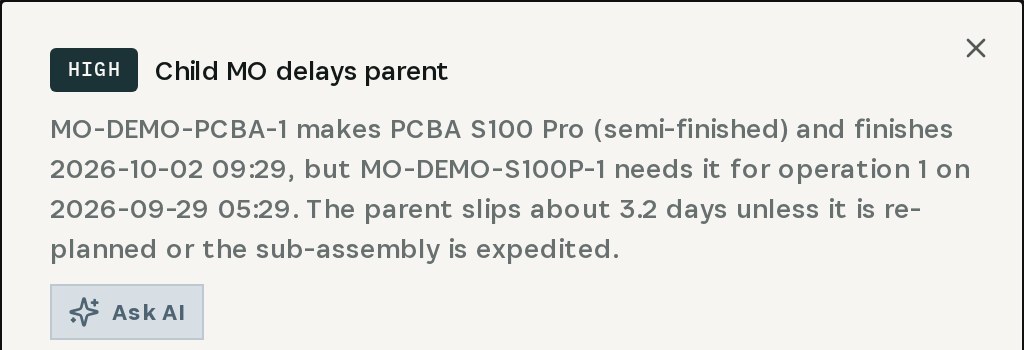
    Child MO delays parent: the board sub-assembly finishes days after the final assembly needs it.
    See the cascade
  2. 02

    See how late the parent will be

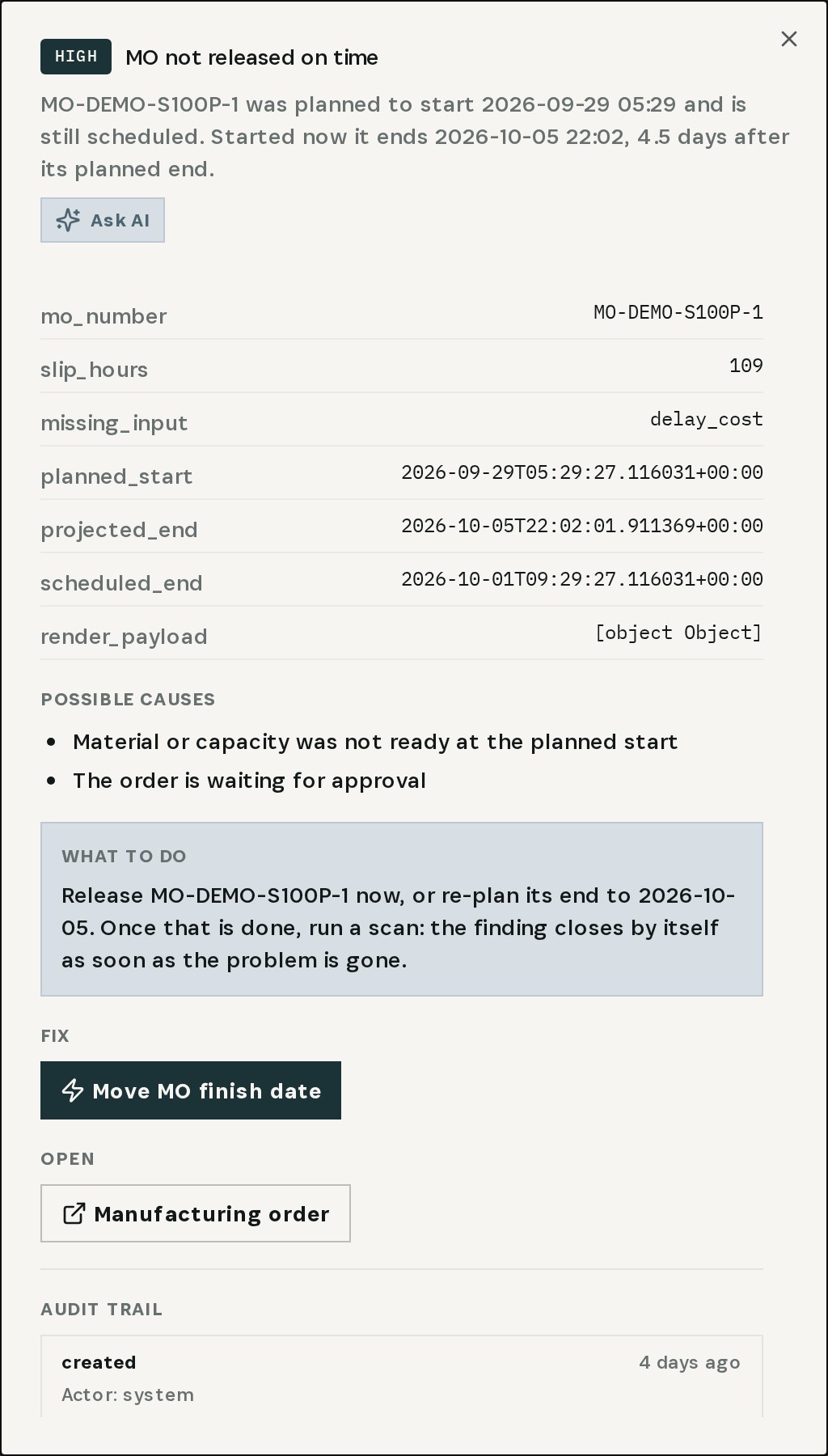
    MO not released on time: started now, the final assembly ends four and a half days after plan.
    See how late the parent will be
  3. 03

    Re-plan the parent

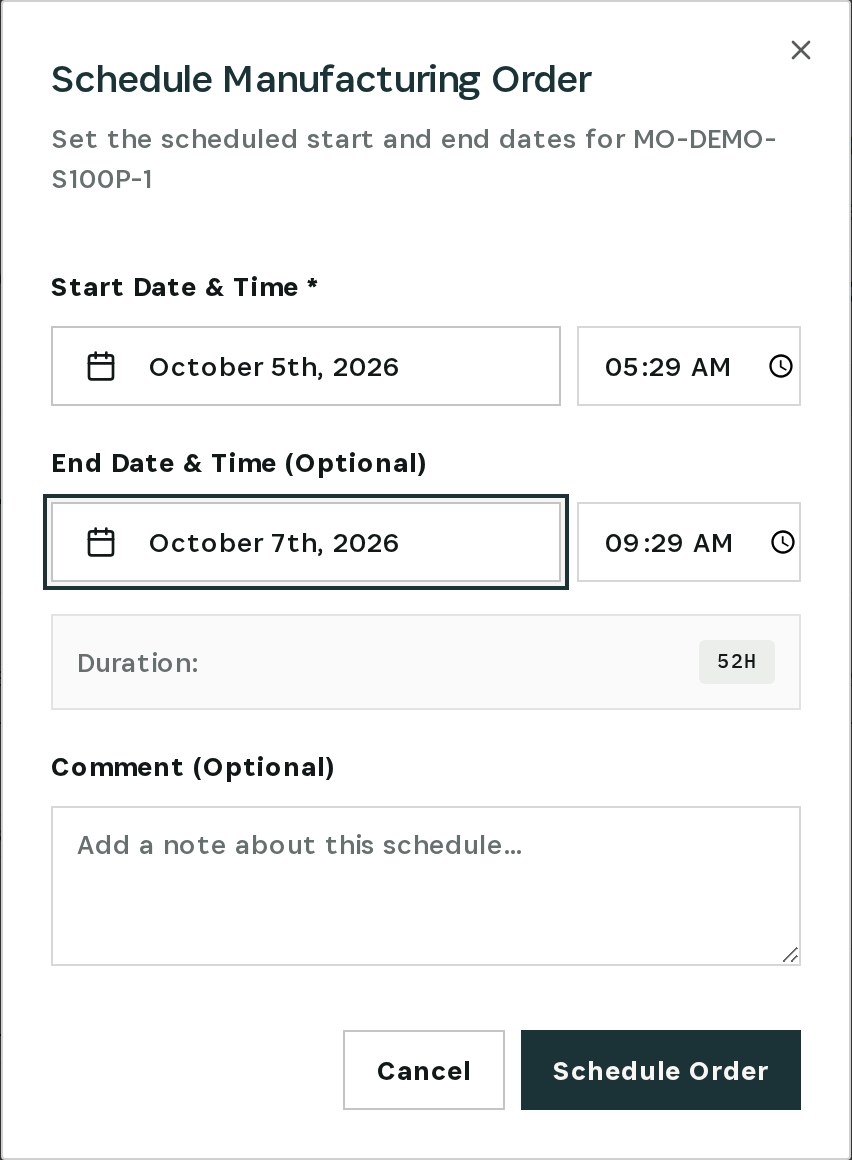
    Move MO finish date opens the schedule; set a start and finish the boards can support, and save.
    Re-plan the parent
03

How It Works

Purpose-built features that solve these exact problems.
01

Cascade detection

The engine compares when a sub-assembly order finishes with when its parent needs it, operation by operation.
02

Slip in days

The finding says how far the parent will slip unless it is re-planned or the sub-assembly is expedited.
03

Late-release check

A parent still waiting to start past its planned date is flagged with the end date it would now reach.
04

Re-plan in one step

Move MO finish date opens the schedule dialog for the parent directly from the finding.
05

Closes by itself

Once the parent's dates match reality, the next scan resolves the finding.
04

What You'll Gain

Tangible improvements that impact your bottom line.
  1. 01
    Dates you can promise

    The finished product's date reflects its slowest part.

  2. 02
    Days of warning

    You see the slip when the sub-assembly runs late, not when assembly stops.

  3. 03
    One decision, one click

    Expedite the part or move the parent — from the finding.

  4. 04
    No surprise to the customer

    The new date is known before anyone asks.

05

Real-World Scenarios

See how this works in practice.
Scenario 1

Boards late, assembly waiting

MO-DEMO-PCBA-1 finishes days after MO-DEMO-S100P-1 needs its boards for operation one.
Scenario 2

Almost five days

Started now, the final assembly would end four and a half days after its planned end.
Scenario 3

Re-planned

The parent is moved to a start and finish the sub-assembly can actually support.
06

The Transformation

From chaos to clarity.
Before
  • Parent and child tracked separately
  • Original dates kept after the slip
  • Finish date recalculated by hand
  • Customer finds out first
After
  • Every child linked to the parent that needs it
  • Slip shown in days
  • Parent re-planned from the finding
  • Finding closes once dates are real
07

Frequently Asked Questions

Quick answers to common questions.
01How does Otiox know which order needs which sub-assembly?
Child manufacturing orders are linked to their parent order, and each parent operation knows which components it consumes, so the engine compares the child's finish with the operation's start.
02Does Otiox move the dates automatically?
No. The finding opens the schedule dialog; you choose the new start and finish.
03Can I expedite the sub-assembly instead?
Yes — open the child order and work on its remaining operations. The finding recalculates once the child's finish moves.
04What about the customer order behind it?
Re-planning the manufacturing order gives you the real finish date to give the customer; the order itself is not changed automatically.
Late Sub-Assembly

Ready to transform your late sub-assembly?

See how Otiox can solve your specific challenges.