Missing Materials

Open orders need thousands of components. You have fewer than two hundred. Nothing is going to order the rest.

Purchasing has a price and a lead time for the part. Planning has no supplier on the material — so when it runs short, shortage purchasing skips it, silently. Otiox's Integrity Engine finds every material your BOMs and open orders depend on that MRP cannot buy, and shows exactly how much is uncovered.
app.otiox.comFig. 00
Integrity · unplannable materials
Short, and nothing will order it
Used by active BOMs, no supplier for MRP
MaterialNeededNot covered
PCB Mainboard Rev35,122 pcs4,942 pcs
Li-Ion Battery 3000mAhopen ordersshort
Aluminum 6061 Sheet255.5 kgno supplier
Draft purchase orders possible: 0
Fix

Set the preferred supplier on the material — ElectroParts KR, 21 days, MOQ 25.

Shortage purchasing can draft the order. Finding closes on the next scan.

01The Challenge

The shortage is real. The purchase order never will be.

A new board went into three BOMs. Purchasing negotiated a price with ElectroParts KR. But nobody set the supplier on the material itself — and that is the field MRP drafts purchase orders from. The shortage report shows red; the automation that should act on it quietly passes over it. In most ERPs you find out when the line stops.
  1. 01
    New materials go into BOMs before their master data is complete
  2. 02
    Shortage purchasing skips anything without a supplier — without telling anyone
  3. 03
    The supplier exists in a price list, just not where planning looks
  4. 04
    Thousands of units short, and no draft purchase order ever appears
02SEE IT IN OTIOX

The same situation, in the product.

Real screens from the Otiox demo workspace, step by step.
  1. 01

    See every material MRP cannot buy

    Inventory → Stock Integrity: Material without supplier for PCB Mainboard Rev3, Li-Ion Battery 3000mAh and Aluminum 6061 Sheet.
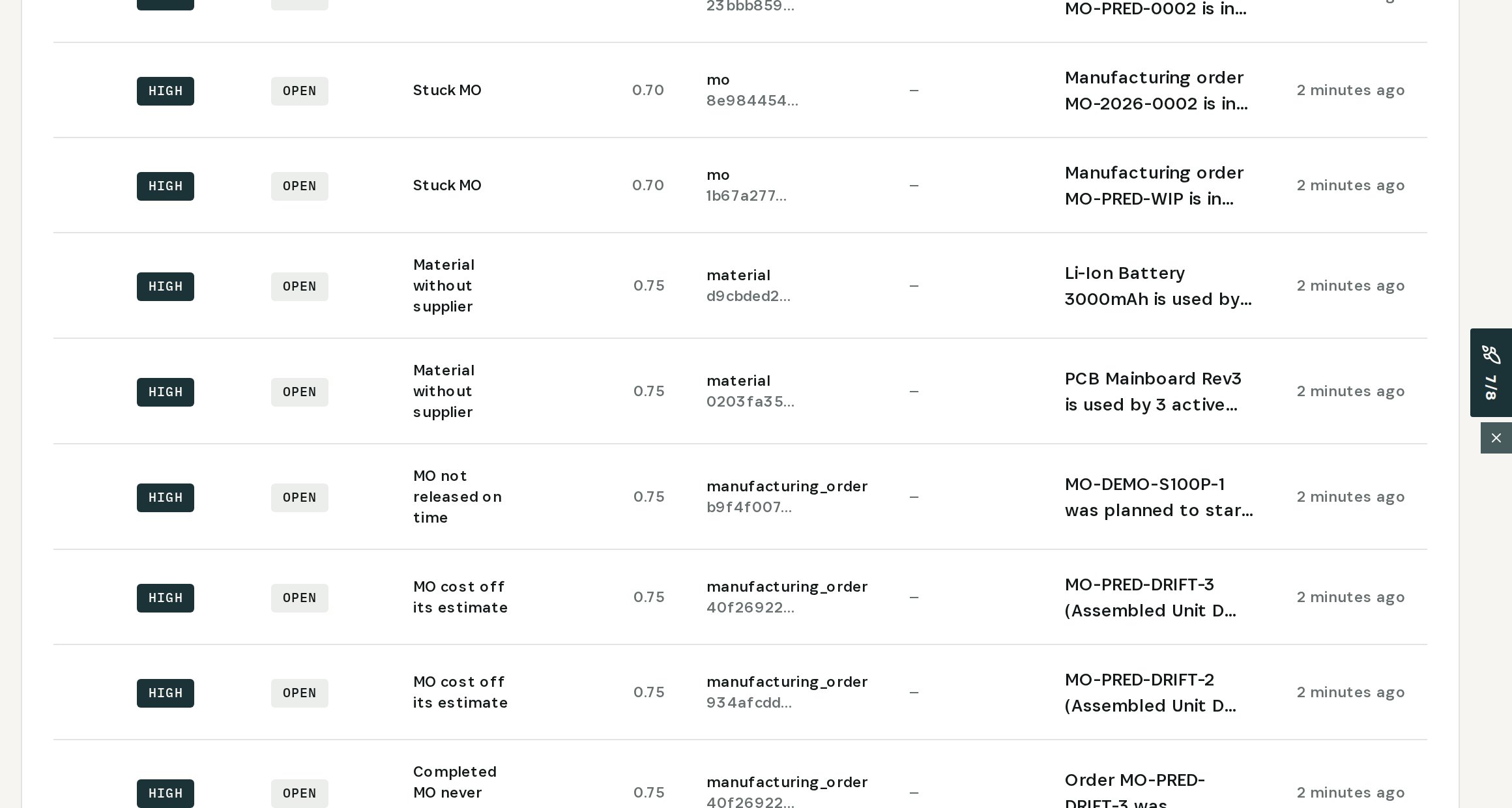
    See every material MRP cannot buy
  2. 02

    Open the finding

    PCB Mainboard Rev3: used by 3 active BOMs, 5,122 units on open orders, 4,942 not covered — and no purchase order can be drafted.
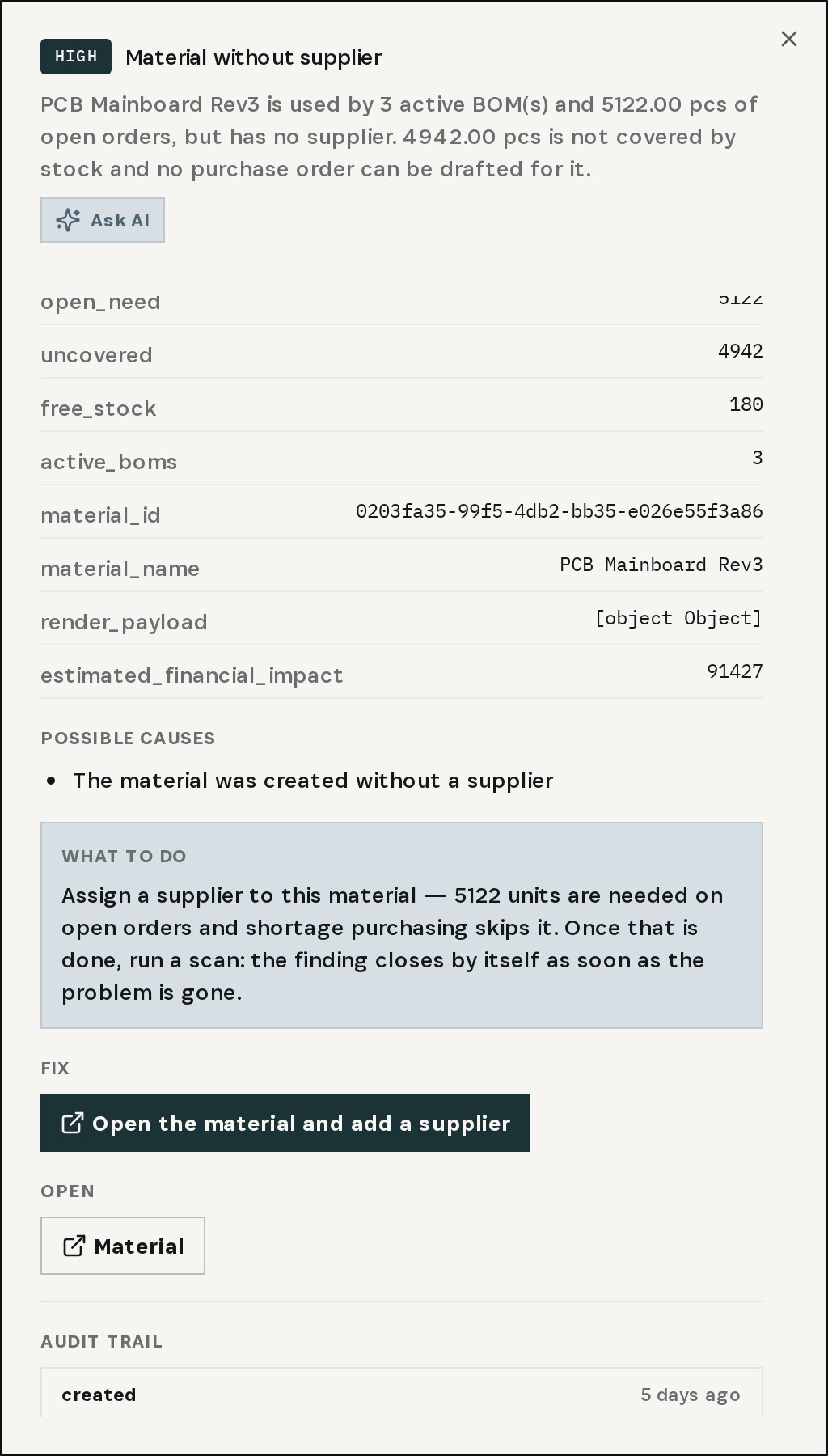
    Open the finding
  3. 03

    Set the preferred supplier

    On the material: ElectroParts KR, SKU EP-PCB-R3, 21-day lead time, MOQ 25. Save, and the next scan closes the finding.
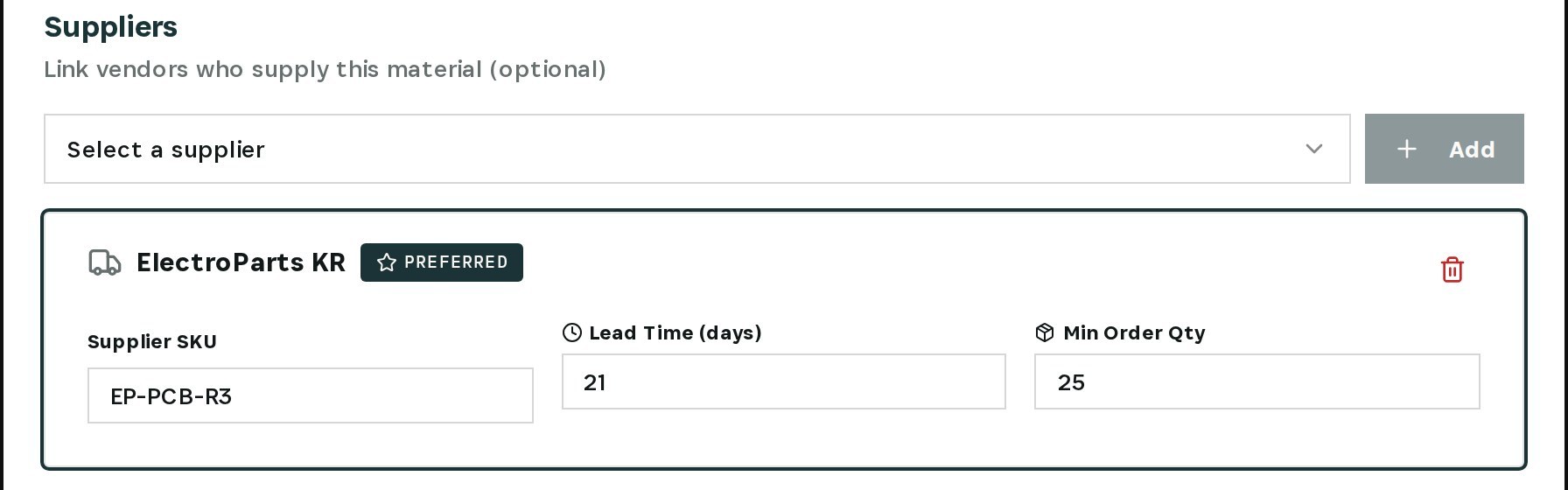
    Set the preferred supplier
03

How It Works

Purpose-built features that solve these exact problems.
01

Unplannable-material check

The Integrity Engine flags every material used by active BOMs or open orders that has no supplier MRP can order from.
02

Shortage in units

Each finding shows how many units open orders need, what stock covers and how many are not covered by anything.
03

Every affected material

PCB Mainboard Rev3, Li-Ion Battery 3000mAh and Aluminum 6061 Sheet — side by side in one findings list.
04

Fix in the material

Set the preferred supplier with SKU, lead time and minimum order quantity on the material, and save.
05

Closes by itself

Once the material has a supplier, the next scan resolves the finding and shortage purchasing can draft from that supplier.
04

What You'll Gain

Tangible improvements that impact your bottom line.
  1. 01
    No silent skips

    A material MRP cannot buy becomes a finding, not a line stop.

  2. 02
    Numbers you can act on

    Units needed, units covered and units missing — per material.

  3. 03
    Fixed at the source

    The supplier goes where planning reads it, not into another spreadsheet.

  4. 04
    Automation that works again

    Shortage purchasing drafts orders from the preferred supplier from then on.

05

Real-World Scenarios

See how this works in practice.
Scenario 1

Thousands needed, a shelf nearly empty

PCB Mainboard Rev3 is used by 3 active BOMs; 4,942 units are not covered and no purchase order can be drafted.
Scenario 2

Three materials, same gap

Li-Ion Battery 3000mAh and Aluminum 6061 Sheet are flagged for the same reason.
Scenario 3

Preferred supplier set

ElectroParts KR, SKU EP-PCB-R3, 21-day lead time, MOQ 25 — saved on the material.
06

The Transformation

From chaos to clarity.
Before
  • Materials in BOMs with no supplier
  • Shortage purchasing skips them silently
  • Supplier hidden in a price list
  • Found when production stops
After
  • Every unplannable material flagged
  • Units uncovered, per material
  • Preferred supplier set on the material
  • Shortage purchasing drafts orders again
07

Frequently Asked Questions

Quick answers to common questions.
01Why would MRP skip a material that is short?
Shortage purchasing drafts purchase orders from the supplier set on the material. With none set, there is nobody to draft the order to, so the material is passed over. The finding makes that visible.
02What counts as a material that needs a supplier?
One used by an active BOM or by open orders. A material nothing uses is not flagged.
03Does the fix create a purchase order?
No. It sets the supplier the automation needs. Purchase orders are drafted by shortage purchasing or created by you, and drafts are never sent without a person.
04What if the supplier is already in a price list?
Open the material, mark that supplier as preferred with its lead time and minimum order quantity, and save — that is the link planning reads.
Missing Materials

Ready to transform your missing materials?

See how Otiox can solve your specific challenges.