Expiring Stock

Forty units expire on Wednesday and nothing will use them. Find out today, not at the count.

Otiox tracks every lot's expiry date, flags lots running out of shelf life, checks whether any order or build will use them in time, and puts the loss in money before it happens — so you mark down, use first or quarantine while there is still a choice.
app.otiox.comFig. 00
Shelf life
2 lots expiring within 7 days — action required
LotQtyLeftPick
Signal Controller
LOT-PRED-0001 · no demand
403dFIFO
Solder Paste SAC305
SP-A · covered by orders
84dFEFO
Seasonal Reagent
LOT-PRED-WASTE · slow seller
12039dFIFO
Recommended

Mark down the Signal Controllers before Oct 7, keep FEFO on the solder paste, and reorder reagent only beyond the 120 on hand.

01The Challenge

Expired stock is usually found by the person who picks it.

A lot of 40 Signal Controllers expires in three days, solder paste in four, and 120 units of a seasonal reagent sell one at a time. The dates are on the labels. Nobody has asked which lots will actually be used before they expire.
  1. 01
    Expiry dates live on labels, not in a list sorted by days left
  2. 02
    The oldest lot sits at the back while the newest gets picked
  3. 03
    Nobody knows whether an order or build will use a lot in time
  4. 04
    The write-off arrives as a surprise at month-end
02SEE IT IN OTIOX

The same situation, in the product.

Real screens from the Otiox demo workspace, step by step.
  1. 01

    Open the lots that are running out

    Batch Management counts the lots expiring within 7 days; the near-expiry filter lists everything within 30, with days left and the strategy that picks it.
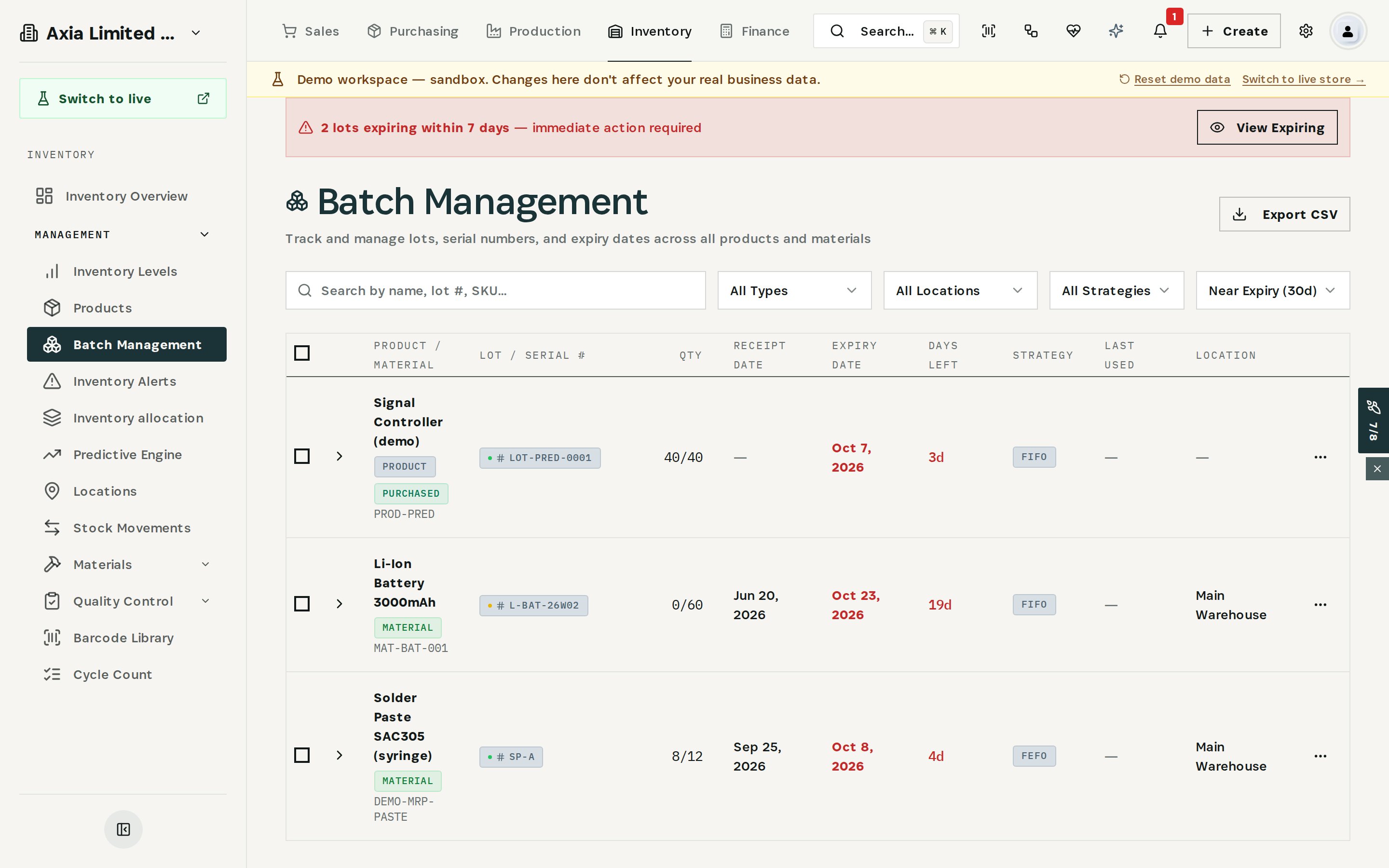
    Open the lots that are running out
  2. 02

    Check whether anything will use it

    40 units, 3 days left, no committed demand — 4,800 at cost if unsold.
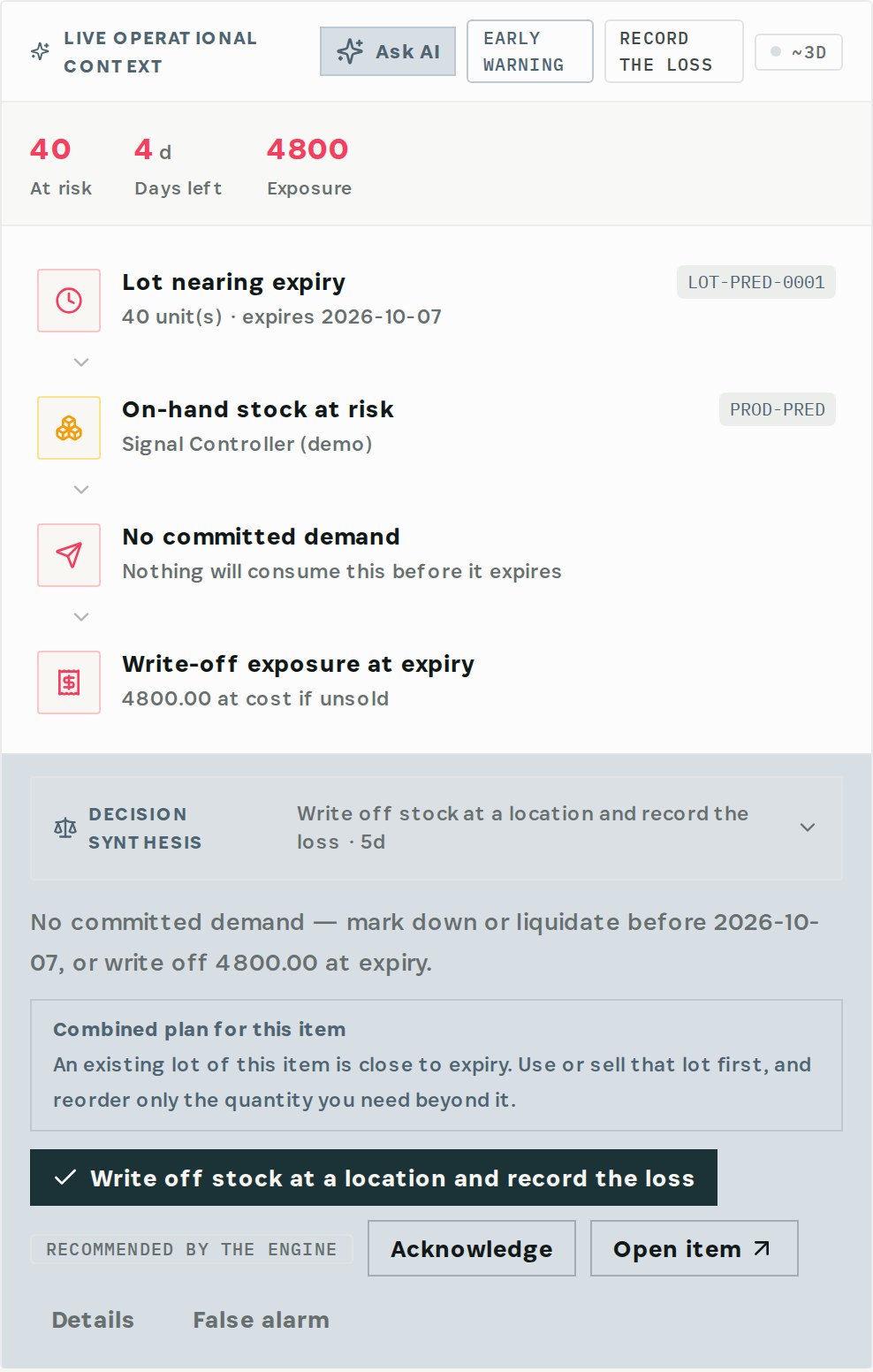
    Check whether anything will use it
  3. 03

    Read the recommendation

    Mark down or liquidate before the date, or write it off — and use the old lot first before reordering.
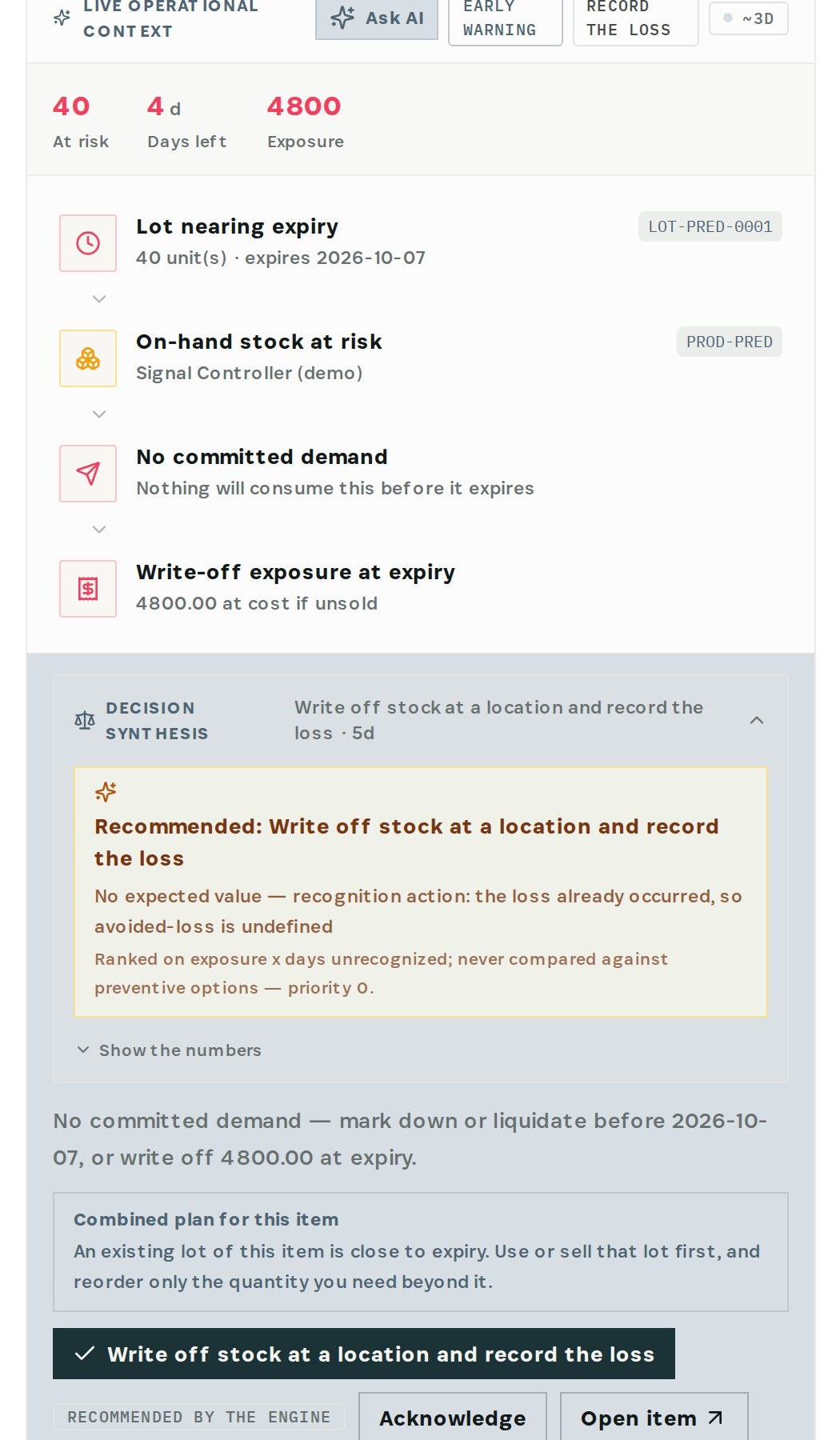
    Read the recommendation
  4. 04

    Act on the lot

    From the lot's menu: view its movements, move it to quarantine, or reorder.
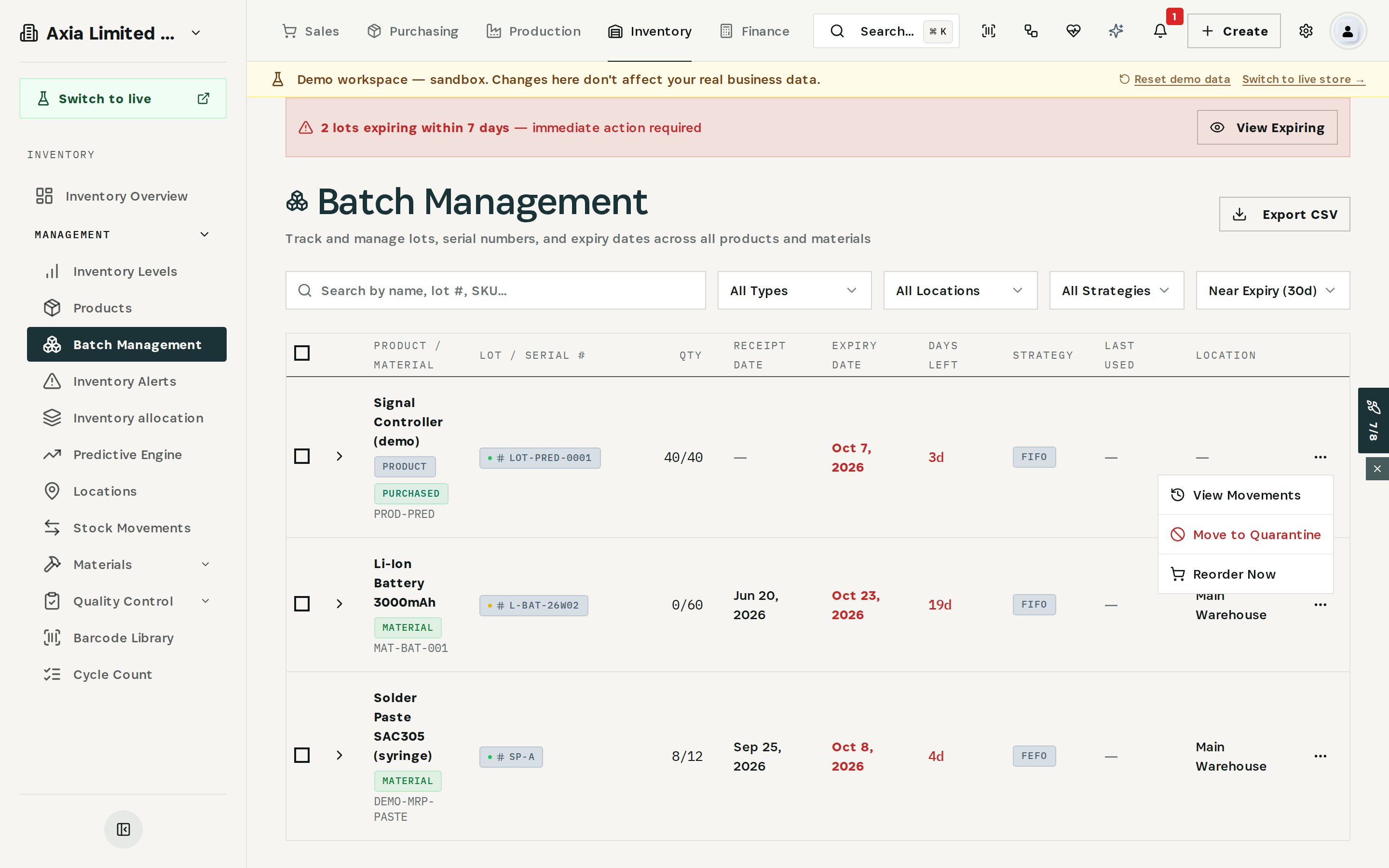
    Act on the lot
03

How It Works

Purpose-built features that solve these exact problems.
01

Batch management

Every lot and serial with quantity, receipt date, expiry date, days left, picking strategy and location; filter to lots near expiry and export to CSV.
02

Expiry alerts

A banner counts lots expiring within 7 days; the near-expiry filter shows everything within 30.
03

Expiry forecasting

The Predictive Engine warns when a lot is about to expire, checks whether committed demand will use it, and puts the write-off exposure in money.
04

Lot strategy per item

Each item picks lots by FEFO, FIFO or LIFO; with FEFO the lot that expires first is suggested first.
05

Lot actions

From the lot's menu: view its movements, move it to quarantine, or reorder.
04

What You'll Gain

Tangible improvements that impact your bottom line.
  1. 01
    See it while there is a choice

    Days left, not a surprise at the count.

  2. 02
    Know what will be used

    Lots with no committed demand are flagged; lots that orders will consume are not noise.

  3. 03
    Put the loss in money

    Write-off exposure at cost, before it happens.

  4. 04
    Order less

    Use the expiring lot first and reorder only the quantity beyond it.

05

Real-World Scenarios

See how this works in practice.
Scenario 1

No demand, three days left

40 Signal Controllers in lot LOT-PRED-0001 expire on October 7 with no committed demand — 4,800 at cost if unsold.
Scenario 2

Covered by demand

Solder paste lot SP-A expires in four days, but open demand will use all 8 units first; it is picked by FEFO.
Scenario 3

Slow seller

120 units of Seasonal Reagent expire in 39 days; one movement in the last 30 days says most of it won't sell in time.
06

The Transformation

From chaos to clarity.
Before
  • Expiry dates on labels
  • Newest lot picked first
  • No link between expiry and demand
  • Write-off discovered at month-end
After
  • Every lot sorted by days left
  • FEFO suggests the lot that expires first
  • Lots without demand flagged
  • Exposure in money before expiry
07

Frequently Asked Questions

Quick answers to common questions.
01How early does Otiox warn?
Batch Management flags lots expiring within 7 days and filters those within 30. The Predictive Engine warns before an on-hand lot expires and says whether committed demand will use it.
02Which lot is picked first?
Each item has a lot strategy: FEFO, FIFO or LIFO. With FEFO, picking suggests the lot that expires first.
03What can I do with a lot that won't sell in time?
Mark it down or sell it first, move it to quarantine from the lot's menu so it is no longer picked, or record the write-off. The engine also suggests reordering only what you need beyond that lot.
04Do expired lots stop being picked automatically?
Otiox marks the lot as expired and flags it. Moving it to quarantine is the step that takes it out of picking.
Expiring Stock

Ready to transform your expiring stock?

See how Otiox can solve your specific challenges.