Lot Recall

A supplier calls about a bad lot. You know where it went before the call ends.

When a supplier flags a defective lot, Otiox quarantines it, traces it into every build it touched and puts the recall on one screen — so the question “where did it go?” has an answer in minutes, not weeks.
app.otiox.comFig. 00
Supplier notice
Li-Ion cells may overheat under load
ElectroParts KR · lot L-BAT-26W02 · voluntary recall
Forward trace
Received from supplierPO-2026-0003
80 cells received
Battery lotL-BAT-26W02
60 cells on hand
Quarantined
Consumed in buildMO-2026-0003
15 × SmartSensor S100
Finished goods lotL-S100B-26W10
22 units · inspect before shipping
MO-2026-0001 still reserves 30 cells from this lot — re-plan before it starts.
Resolve the recall
Return to supplier
Write off
Release
01The Challenge

A recall is a race against your own records

The supplier's email says one lot of battery cells may overheat. Now someone has to find every unit of that lot, every build that consumed it and every order that is about to ship it — usually across a stock sheet, a production log and an inbox.
  1. 01
    Nobody can say which finished goods contain the affected lot
  2. 02
    Stock from the bad lot keeps getting picked while people investigate
  3. 03
    Planned builds still reserve the lot, so the problem is reproduced tomorrow
  4. 04
    The paper trail for the supplier claim and the auditor is assembled by hand
02SEE IT IN OTIOX

The same situation, in the product.

Real screens from the Otiox demo workspace, step by step.
  1. 01

    Start the recall

    Choose the location, the reason and a short description of the supplier's notice.
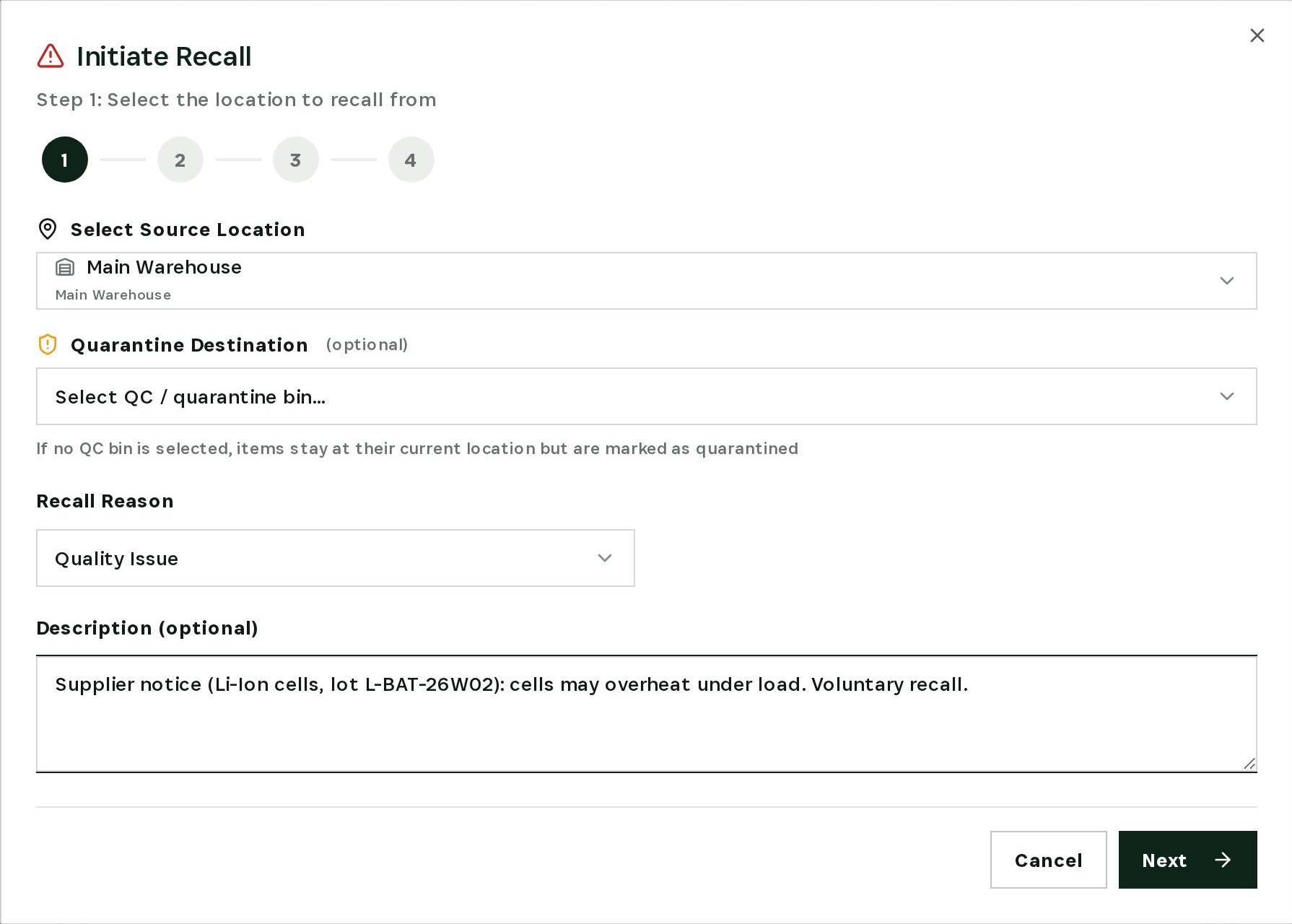
    Start the recall
  2. 02

    Pick the exact lot

    Materials and products at the location are listed with their lots. Add the affected lot and set the quantity.
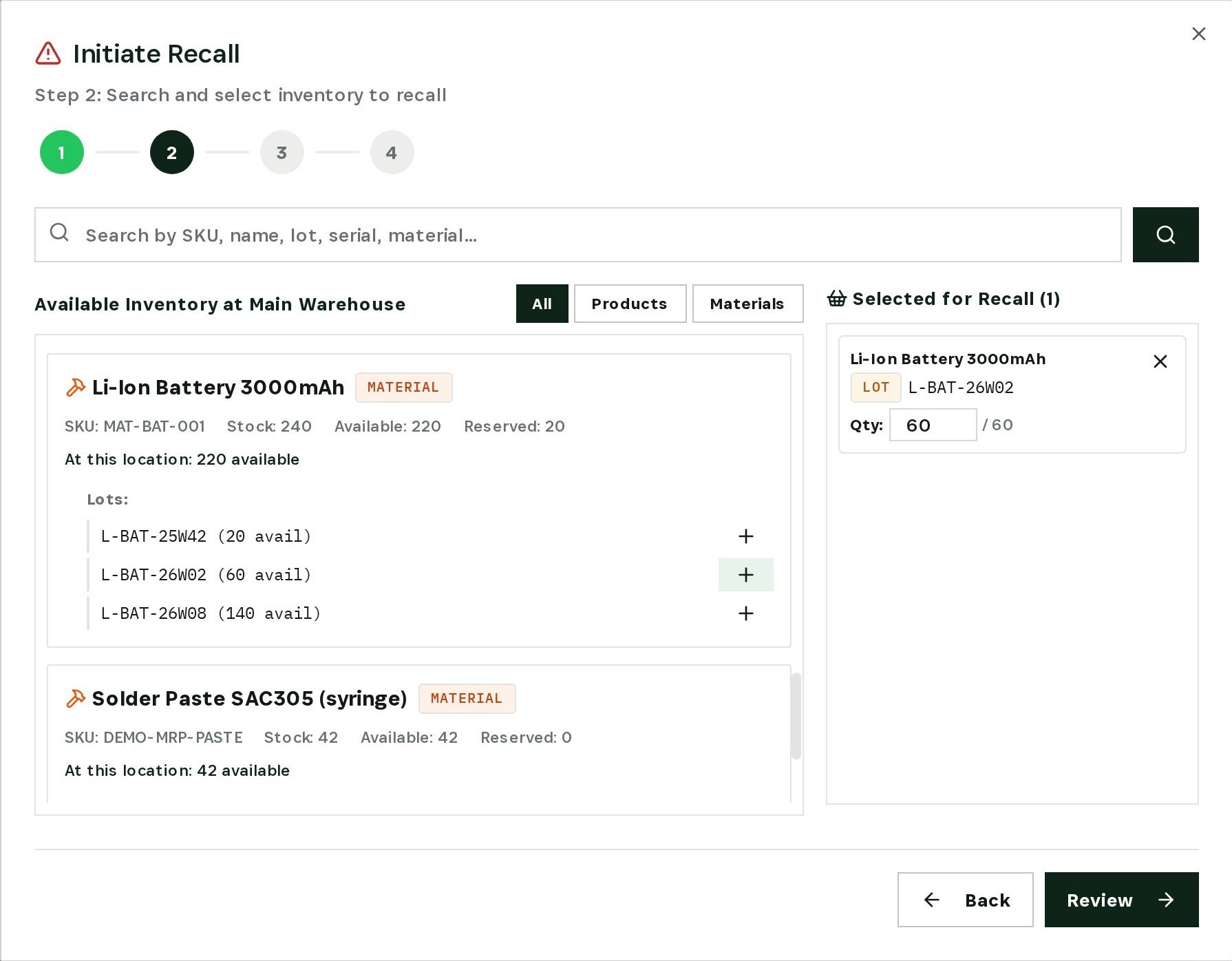
    Pick the exact lot
  3. 03

    Review, then execute

    Check location, reason, lot and quantity once more, then run the recall. The lot is quarantined immediately.
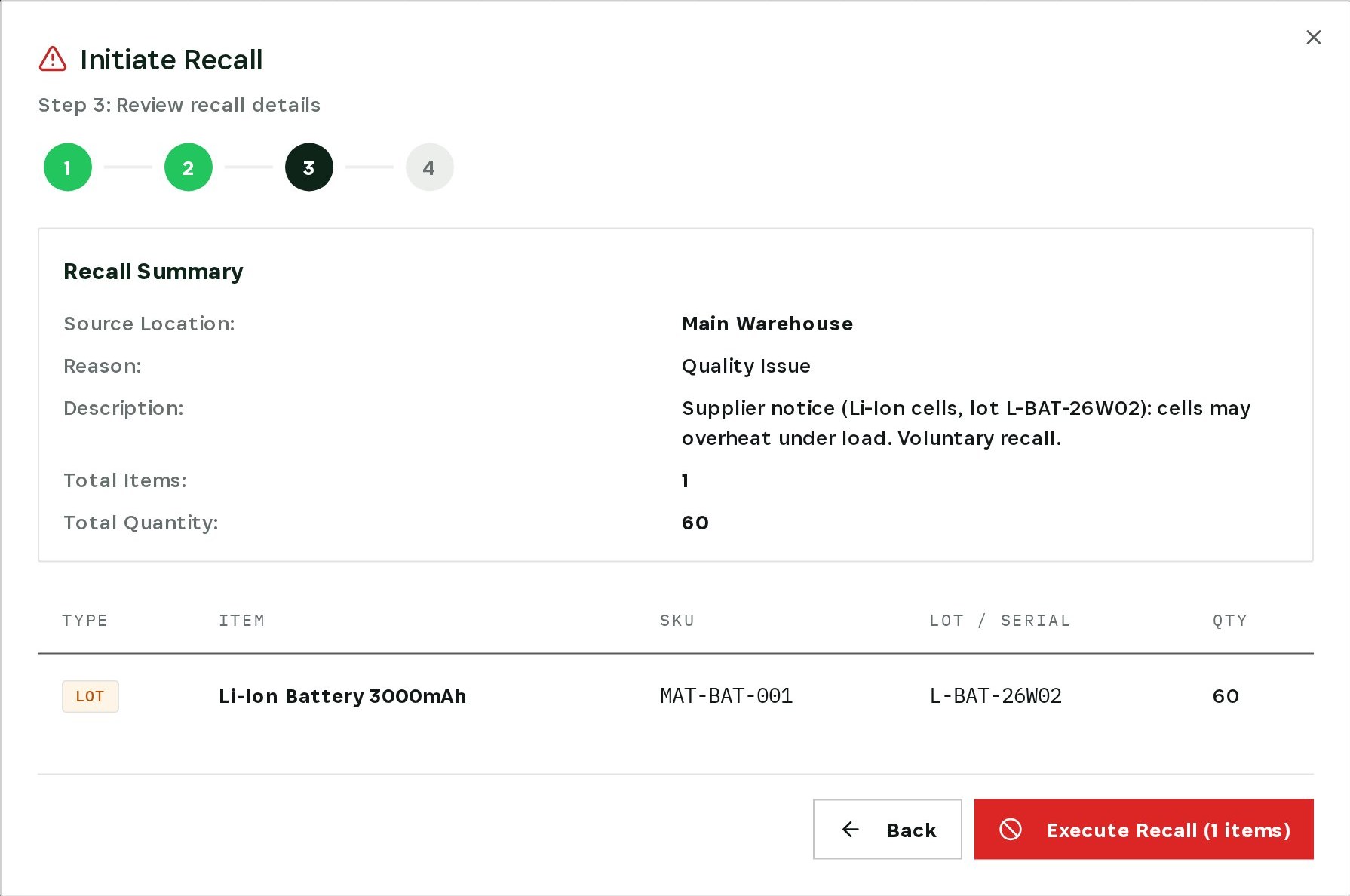
    Review, then execute
  4. 04

    Trace it into finished goods

    The genealogy of a SmartSensor lot shows it was built from the quarantined battery lot — the batch to inspect first.
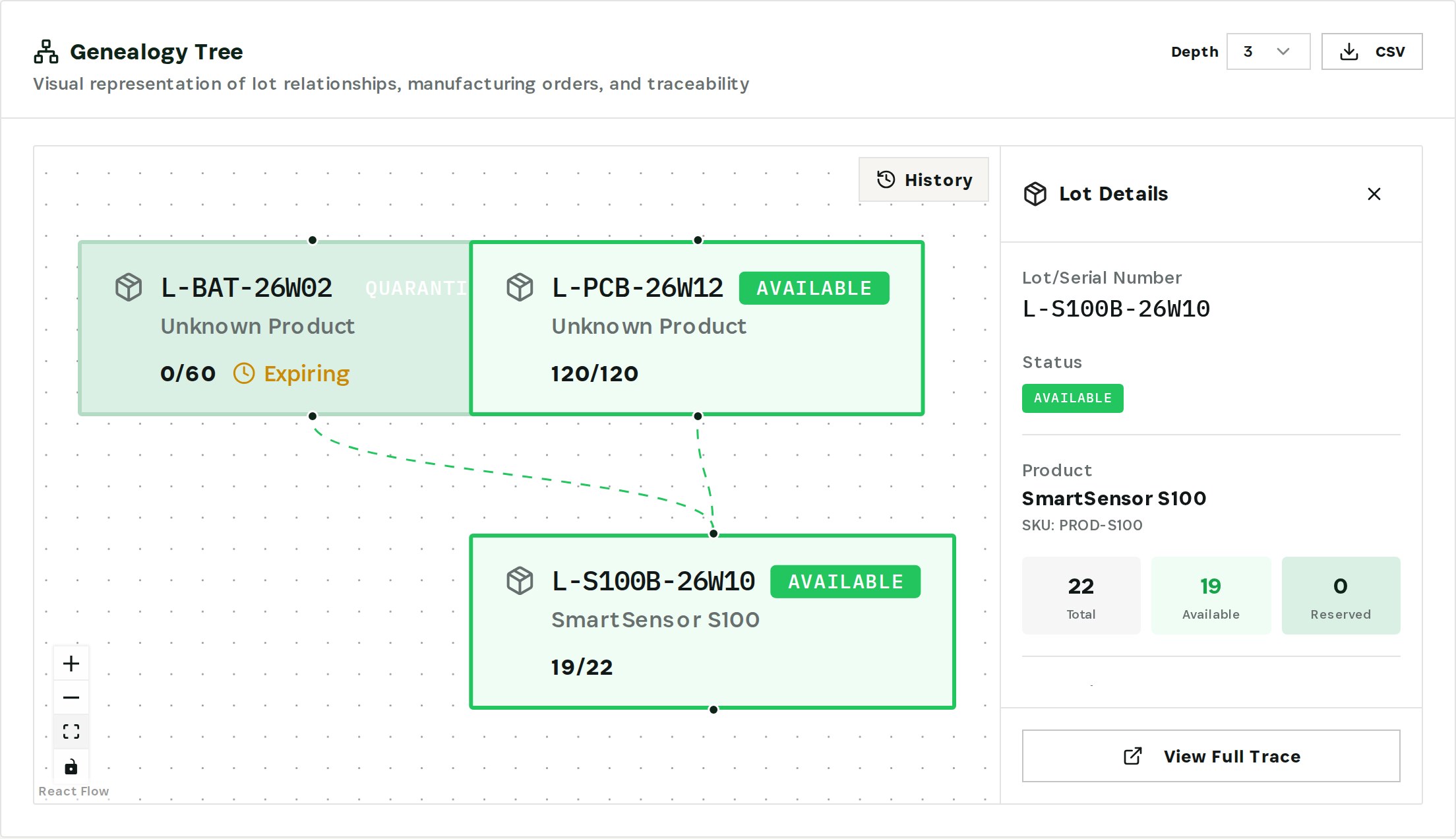
    Trace it into finished goods
  5. 05

    Resolve the recall

    Return the lot to the supplier, write it off, or release it back to available stock if the notice is withdrawn.
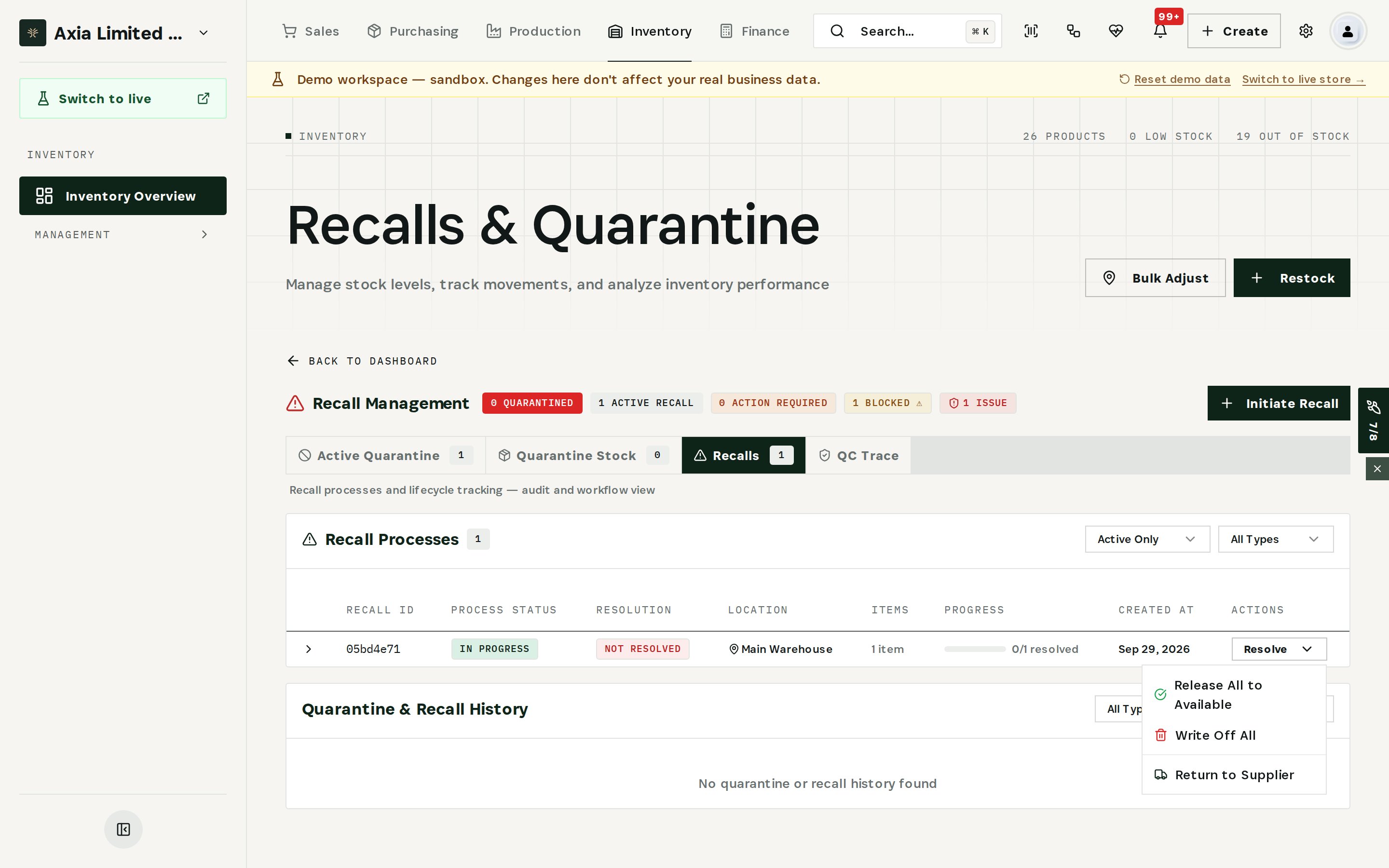
    Resolve the recall
03

How It Works

Purpose-built features that solve these exact problems.
01

Guided recall

A four-step recall: choose the location and reason, pick the exact lot, review, execute. The lot is quarantined the moment the recall runs.
02

Lot genealogy

See every lot a finished good was built from, and every build a lot went into — as a graph you can read in seconds and export to CSV.
03

Quarantine by status

Quarantined lots stay visible but cannot be picked, reserved or shipped. Availability drops to zero immediately.
04

One recall screen

Active quarantine, quarantine stock, recall processes and QC trace in one place, with progress for every recall.
05

Resolution paths

Resolve a recall by returning the lot to the supplier, writing it off, or releasing it back to available stock if the notice is withdrawn.
04

What You'll Gain

Tangible improvements that impact your bottom line.
  1. 01
    Contain in minutes

    The affected lot is out of circulation before the next pick list is printed.

  2. 02
    Answer the hard question

    Which finished goods contain the lot is a search, not a project.

  3. 03
    Stop repeating the mistake

    Builds that were about to consume the lot are visible, so they can be re-planned before they start.

  4. 04
    Evidence on file

    Reason, quantity, lot and status are recorded with the recall — ready for the supplier claim and the auditor.

05

Real-World Scenarios

See how this works in practice.
Scenario 1

Supplier notice on battery cells

ElectroParts KR reports that lot L-BAT-26W02 may overheat. The recall quarantines all 60 cells at the main warehouse in one action.
Scenario 2

Finished goods built from the lot

The genealogy of SmartSensor lot L-S100B-26W10 shows it was built from L-BAT-26W02 — the batch that needs inspection before it ships.
Scenario 3

Choosing the resolution

Once the supplier confirms, the recall is resolved by returning the lot for credit, writing it off, or releasing it if the notice is withdrawn.
06

The Transformation

From chaos to clarity.
Before
  • Searching spreadsheets for the lot number
  • Bad stock picked while the team investigates
  • Builds keep reserving the recalled lot
  • Evidence assembled by hand
After
  • Lot quarantined in one guided recall
  • Availability drops to zero immediately
  • Genealogy shows every build the lot touched
  • Reason, lot and quantity recorded with the recall
07

Frequently Asked Questions

Quick answers to common questions.
01Can I recall materials as well as finished products?
Yes. The recall wizard lists products and materials at the chosen location, with each lot and its available quantity.
02What happens to quarantined stock?
It stays on record but cannot be picked, reserved or shipped until the recall is resolved.
03How far back and forward does traceability go?
The genealogy graph follows lots through manufacturing orders in both directions, with an adjustable depth, and exports to CSV.
04Does a recall notify customers automatically?
No. Otiox shows which stock and builds are affected; contacting customers stays a decision your team makes.
Lot Recall

Ready to transform your lot recall?

See how Otiox can solve your specific challenges.