Month-End Count

The count says one thing. The books say another. Find out why before you close.

Otiox continuously checks your stock for the errors that make counts and books disagree — phantom stock, lots that don't add up, drift between bins and totals — explains each one, and lines up the count variances for approval before they reach the ledger.
app.otiox.comFig. 00
Integrity scan
Completed 2 minutes ago
4Critical
18High
19Warning
Stock with no movement historyphantom_stock
Bulky Enclosure · 20 units · value 1,000 · never moved or counted
Product lots ≠ stockover_tracked
Sensor module · 0 on hand · 3 serial numbers
Monthly count · Aisle A
ItemSystem → countedVar.Value
SmartSensor S10090 → 65-25$310
Precision PCB132 → 120-12$102
Cable Set CS-1210 → 202-8$120
What to do

Count the enclosures before approving the Aisle A variances — then post the approved adjustment.

01The Challenge

A count variance is a symptom. The cause is somewhere else.

At month-end the warehouse counts 25 fewer sensors than the system expects. Finance wants a number to post; operations wants to know where the units went. Usually nobody knows whether it is theft, a missed receipt, a double booking or stock that never existed.
  1. 01
    Variances are written off without anyone knowing the cause
  2. 02
    Stock that exists only in the system inflates inventory value for months
  3. 03
    Lot and serial records drift away from the quantities on hand
  4. 04
    The adjustment reaches the ledger without an approval trail
02SEE IT IN OTIOX

The same situation, in the product.

Real screens from the Otiox demo workspace, step by step.
  1. 01

    Run the integrity scan

    Before the count, the Integrity Engine lists every inconsistency it can find, ranked by severity.
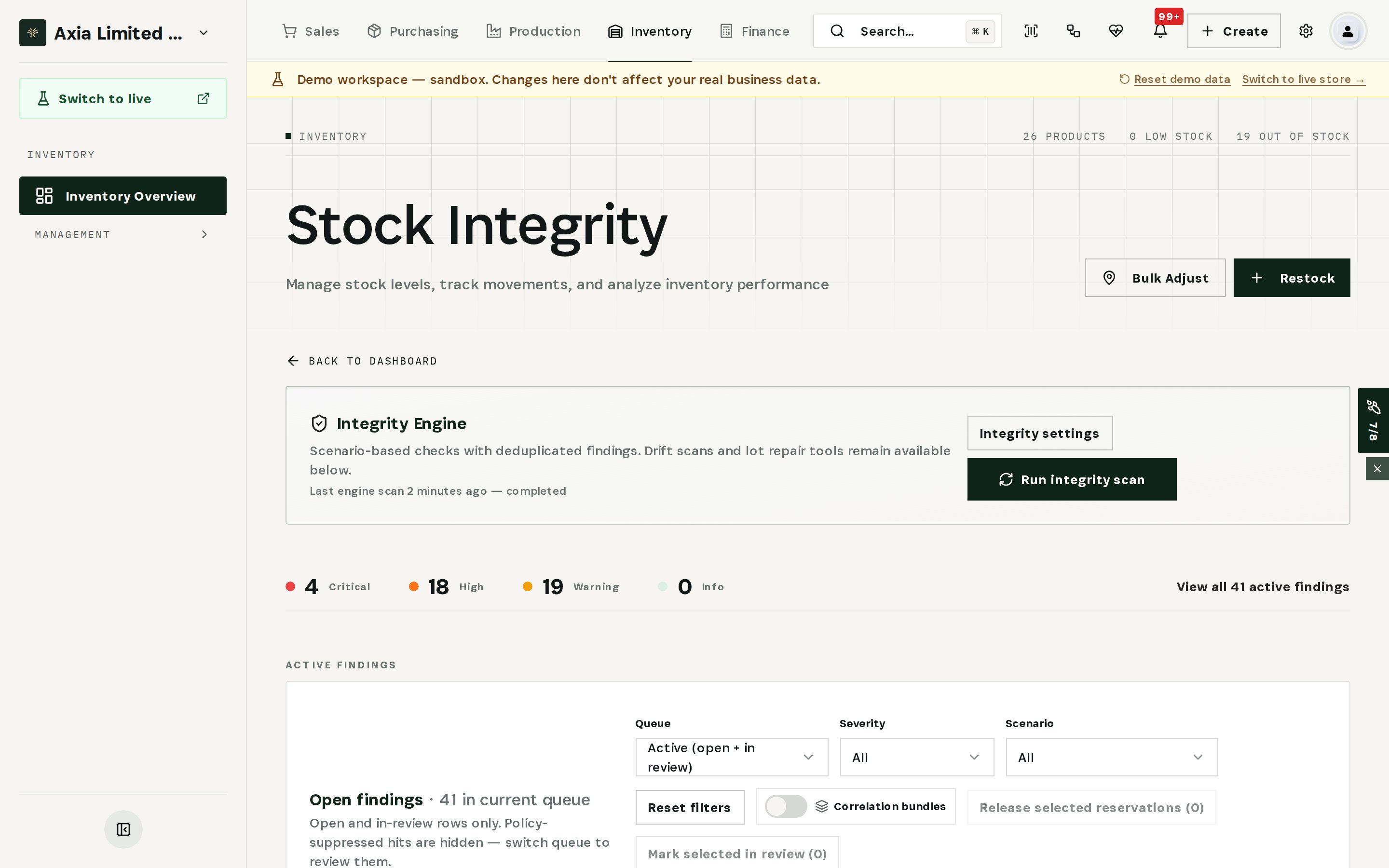
    Run the integrity scan
  2. 02

    Read the finding, then act

    Twenty units on the books, never moved or counted. The finding explains the likely cause, what to do, and offers the fix.
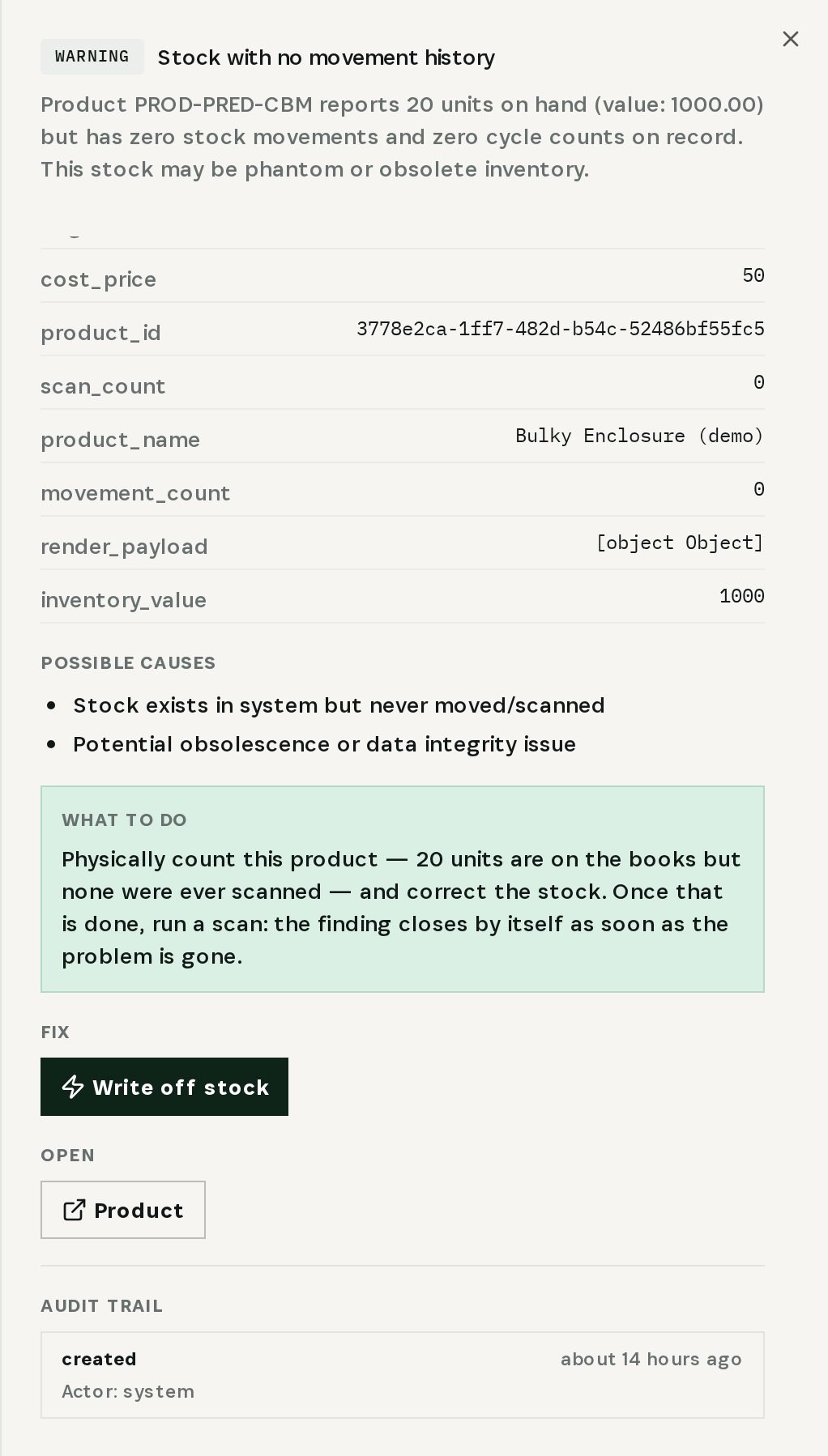
    Read the finding, then act
  3. 03

    Check drift between bins, lots and totals

    Over-tracked serials, negative stock and derived drift are listed side by side, with repair actions for each.
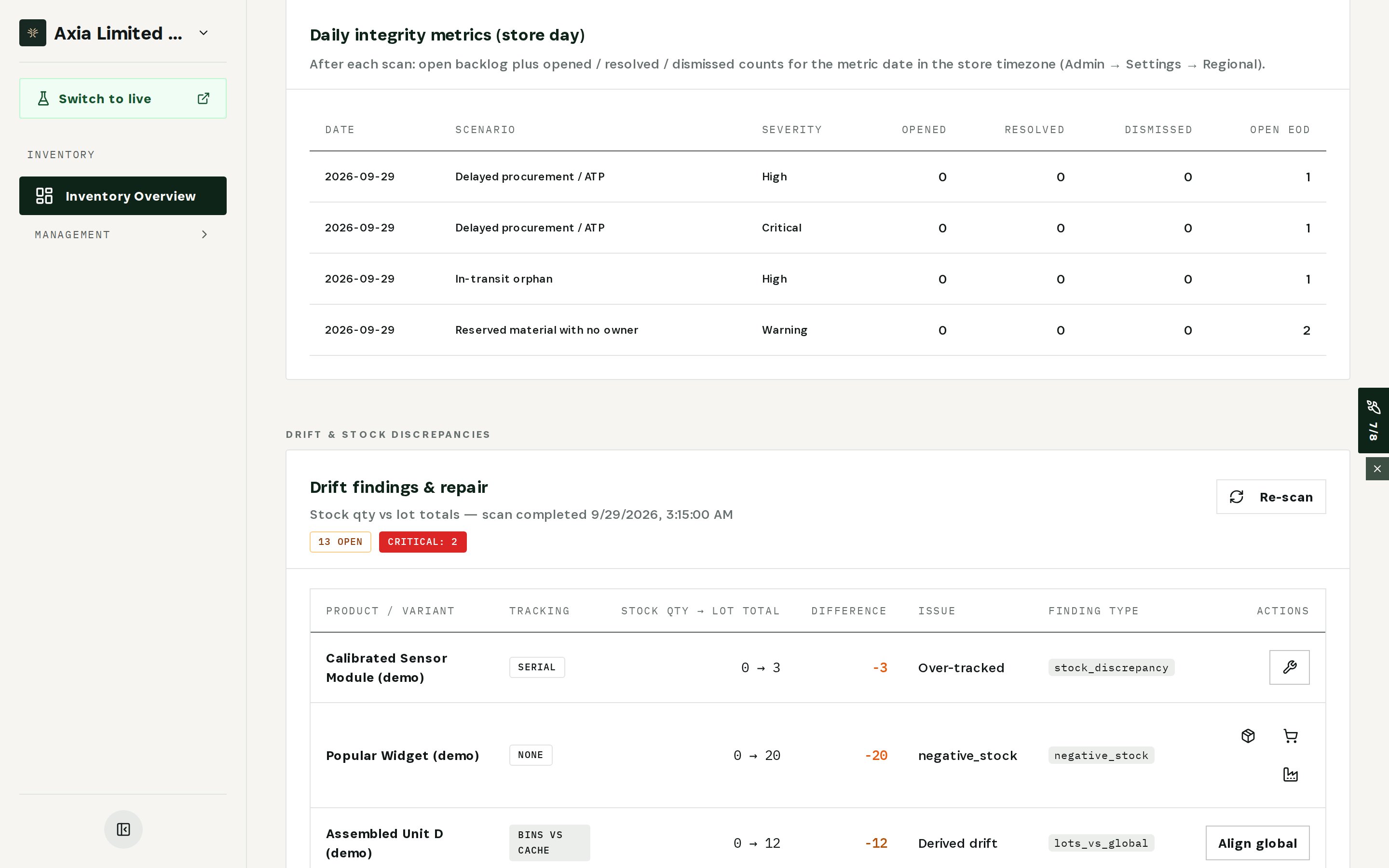
    Check drift between bins, lots and totals
  4. 04

    Approve the count variances

    Every counted line waits with system quantity, counted quantity, variance and value — approve or recount before anything is posted.
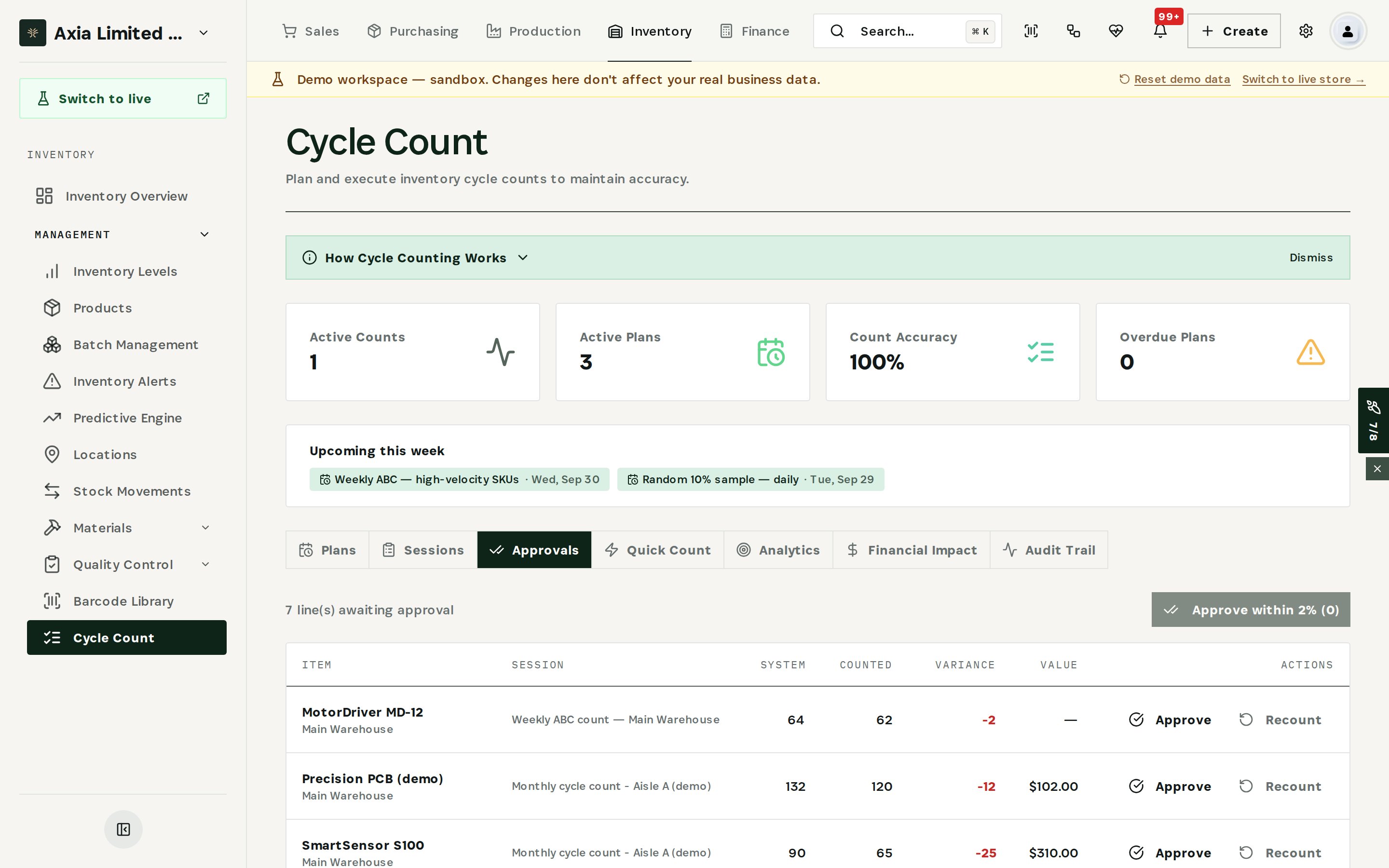
    Approve the count variances
03

How It Works

Purpose-built features that solve these exact problems.
01

Integrity Engine

Dozens of detectors scan your operation for inconsistencies — negative stock, phantom stock, lots that don't match on-hand, reservations without an owner — ranked by severity.
02

Explained findings

Every finding comes with a confidence score, a root-cause hint, possible causes and a plain-language “what to do”, plus the fix that applies.
03

Drift & repair

Differences between bin quantities, lot totals and global stock are listed side by side, with repair actions for each type of drift.
04

Cycle counts with approvals

Plans, sessions and quick counts feed one approval queue showing system quantity, counted quantity, variance and value.
05

Financial posting

Once every line in a session is approved, its net adjustment is posted to the ledger as a permanent entry — reversible, never deleted.
04

What You'll Gain

Tangible improvements that impact your bottom line.
  1. 01
    Know the cause, not just the gap

    Findings explain why stock and records disagree, so the variance is corrected at the source instead of written off.

  2. 02
    Close with confidence

    Only approved variances reach the ledger, each with who approved it and when.

  3. 03
    Catch phantom stock

    Stock that has never moved or been counted is flagged with its value, before it distorts another month of reports.

  4. 04
    Fewer surprises next month

    Findings close themselves once the problem is gone, so the same error does not come back unnoticed.

05

Real-World Scenarios

See how this works in practice.
Scenario 1

Phantom stock nobody has counted

Twenty Bulky Enclosures sit on the books with zero movements and zero counts. The finding says what to do — count them — and offers a write-off if they are not there.
Scenario 2

Serials that don't exist

A sensor module shows 0 on hand but 3 serial numbers. Picking and recalls would trace units that are not there; the drift view flags it as over-tracked.
Scenario 3

Aisle A comes up short

The monthly count finds 25 SmartSensors, 12 PCBs and 8 cable sets fewer than expected. Each line waits in the approval queue with its value before anything is posted.
06

The Transformation

From chaos to clarity.
Before
  • Variances written off without a cause
  • Phantom stock inflating inventory value
  • Lot records drifting from on-hand
  • Adjustments posted without approval
After
  • Every inconsistency explained with a root cause
  • Stock that never moved flagged with its value
  • Drift between bins, lots and totals listed with repairs
  • Only approved variances reach the ledger
07

Frequently Asked Questions

Quick answers to common questions.
01How often does the Integrity Engine scan?
Scans run on a schedule you set, and you can run one at any time with Run integrity scan.
02Does the engine change stock by itself?
Only if you allow it. Auto-fix can stay off, so every correction is a decision your team makes from the finding.
03What happens after a variance is approved?
When every line in a count session is approved, the session's net adjustment can be posted to the ledger. Posted entries can be reversed but never deleted.
04Can counts be blind?
Yes. Count plans can hide system quantities from counters, so the count isn't anchored to what the system expects.
Month-End Count

Ready to transform your month-end count?

See how Otiox can solve your specific challenges.