Approval Bottleneck

The purchase order has been waiting for approval for five days. The supplier's lead time hasn't even started.

Approval rules protect spending — and quietly add days to every delivery when the approver is busy, travelling or simply never saw the request. Otiox's Integrity Engine flags every purchase order stuck in approval, counts the days the delivery clock hasn't been running and takes you straight to the decision.
app.otiox.comFig. 00
Integrity · approvals
Waiting for a signature
The supplier's lead time hasn't started
POSupplierWaiting
PO-2026-0004MetalCo GmbH · $2,4005 days
PO-2026-0005ElectroParts KR · $1,4805 days
Delivery delayed so far: 5 days
Fix

Approve or reject from the finding — or delegate approvals while the approver is away.

POR-00085 approved. The order can go to the supplier.

01The Challenge

Every day in approval is a day added to delivery.

PO-2026-0004 for MetalCo GmbH, $2,400, has waited five days for a signature. The buyer thinks it's ordered. The planner counts on its delivery date. The supplier doesn't know it exists. In most ERPs the request sits in an inbox until someone asks where the material is.
  1. 01
    Approval requests wait silently in one person's queue
  2. 02
    The supplier's lead time starts only when the PO is sent
  3. 03
    Buyers and planners assume the order is on its way
  4. 04
    No one sees how many days approvals add to delivery
02SEE IT IN OTIOX

The same situation, in the product.

Real screens from the Otiox demo workspace, step by step.
  1. 01

    See the stuck approval

    Stock Integrity: PO stuck in approval — PO-2026-0004 has waited 5 days; the delivery clock has not started.
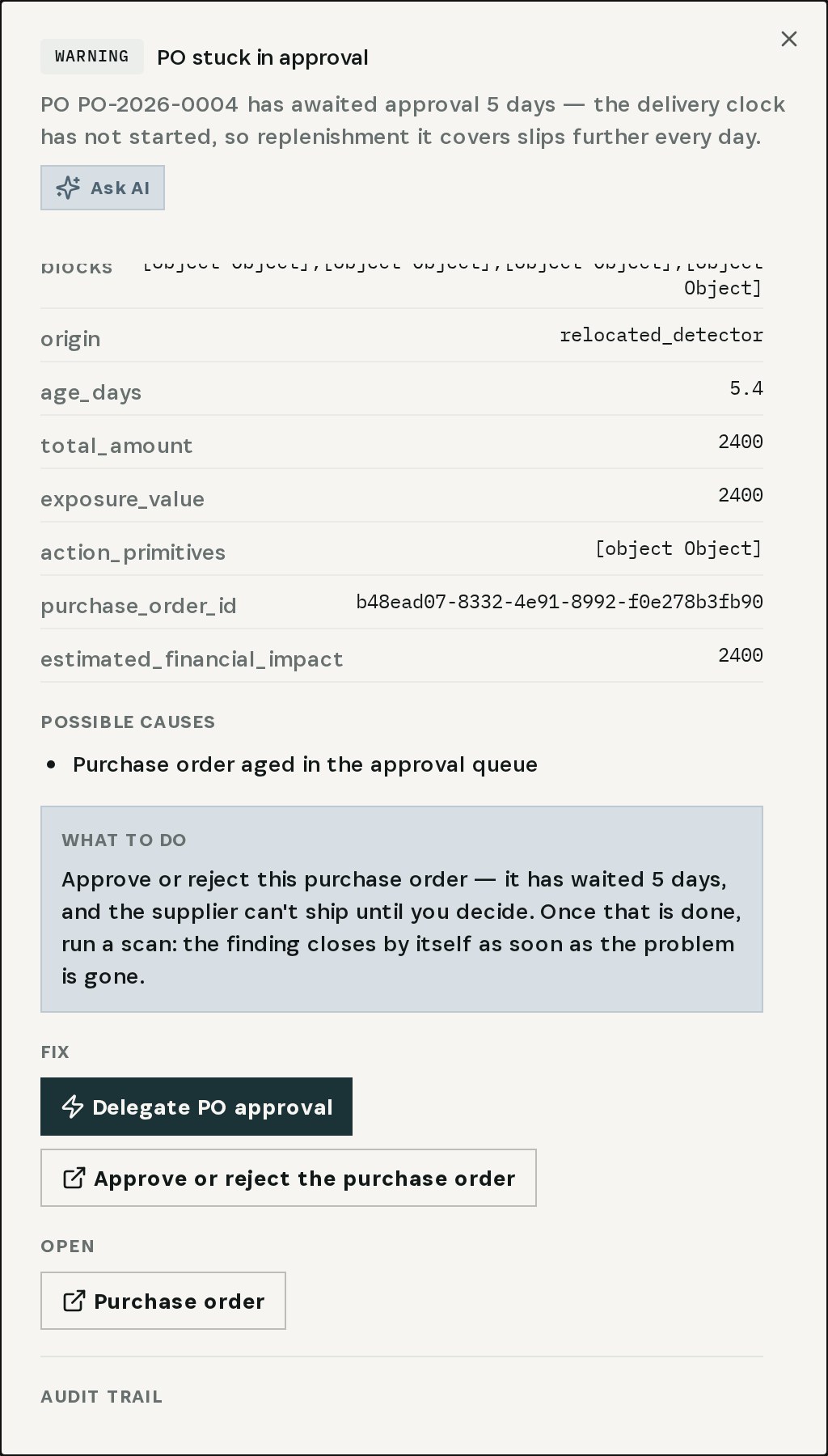
    See the stuck approval
  2. 02

    Open the pending requests

    Approve or reject the purchase order opens PO Approval Requests: two pending, both 5 days old.

    Open the pending requests
  3. 03

    Review and decide

    PO-2026-0004, MetalCo GmbH, $2,400, draft — approve or reject with an optional comment.
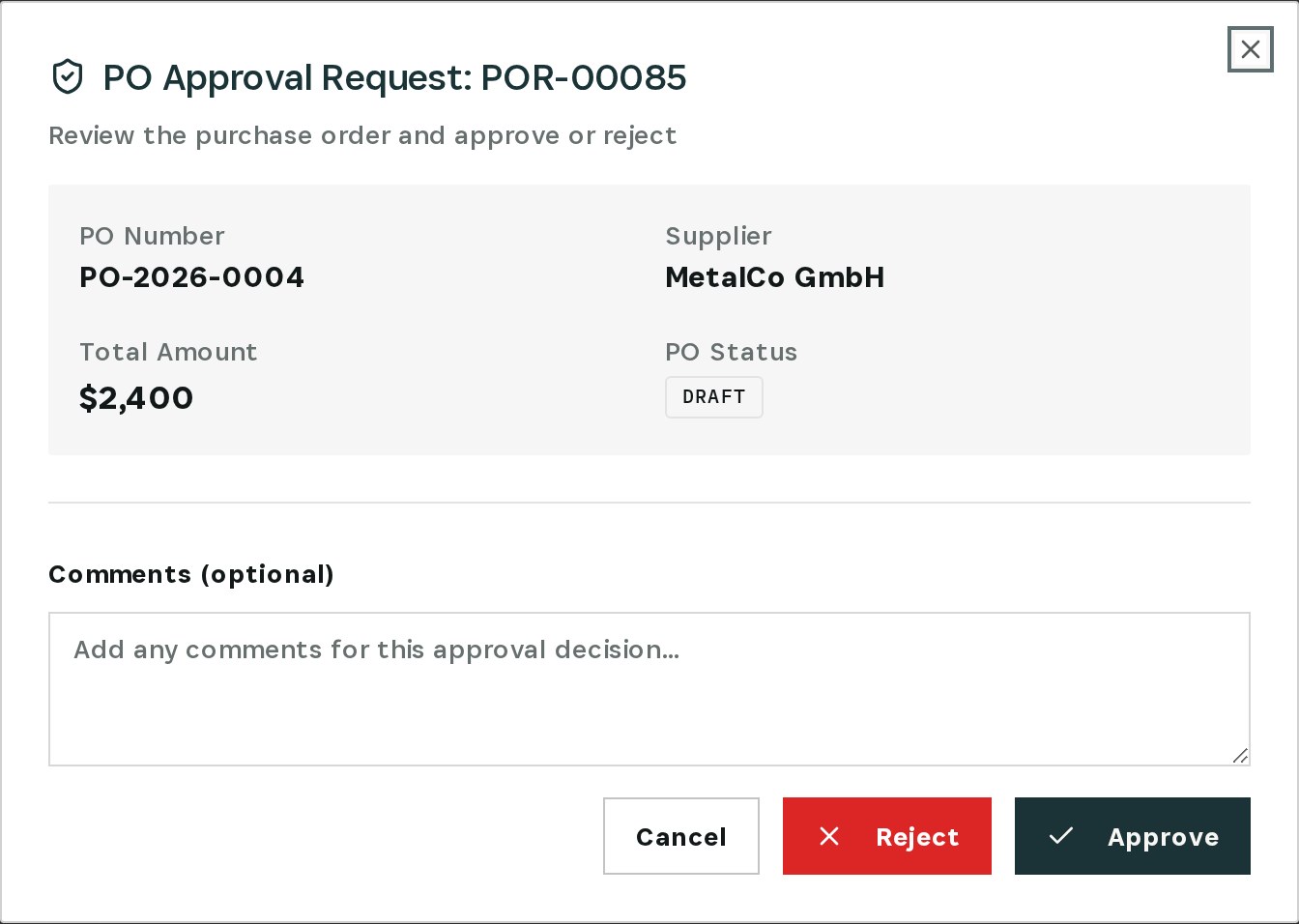
    Review and decide
  4. 04

    Approved

    POR-00085 is approved; the order can go to the supplier.

    Approved
03

How It Works

Purpose-built features that solve these exact problems.
01

Stuck-approval check

The Integrity Engine flags purchase orders that have waited in approval past the threshold and says how long.
02

Straight to the decision

From the finding, Approve or reject the purchase order opens the approval request.
03

All pending in one place

PO Approval Requests lists every pending request with supplier, total, rule and age.
04

Approve with a comment

Review the order and approve or reject it, with an optional comment.
05

Delegation

Delegate PO approval is offered on the finding, so approvals don't stop when one person is away.
04

What You'll Gain

Tangible improvements that impact your bottom line.
  1. 01
    Days back on every delivery

    The supplier's clock starts when it should.

  2. 02
    No silent queues

    A request waiting too long becomes a finding.

  3. 03
    Planners plan on facts

    An order in approval is visibly not ordered yet.

  4. 04
    Controls stay in place

    Approval rules still apply — they just don't stall.

05

Real-World Scenarios

See how this works in practice.
Scenario 1

Five days in approval

PO-2026-0004, MetalCo GmbH, $2,400 — requested five days ago, still pending.
Scenario 2

Two requests waiting

PO-2026-0005 for ElectroParts KR, $1,480, has waited just as long.
Scenario 3

Approved in one review

POR-00085 approved from the review dialog; the order can now be sent.
06

The Transformation

From chaos to clarity.
Before
  • Requests wait unseen
  • Lead time starts days late
  • Everyone assumes it's ordered
  • Delays blamed on the supplier
After
  • Every stuck approval flagged with its age
  • One click from finding to decision
  • Approve or reject with a comment
  • Delegation for when the approver is away
07

Frequently Asked Questions

Quick answers to common questions.
01When is an approval considered stuck?
When a purchase order has waited in approval longer than the threshold. The finding states how many days.
02Does Otiox approve anything for me?
No. The finding takes you to the approval request; a person approves or rejects it.
03Is the PO sent to the supplier when it is approved?
Approval clears the order to be sent; sending it to the supplier is the next step on the purchase order.
04How do I keep it from happening again?
Set up a delegation so another approver covers when the usual one is away — the finding offers Delegate PO approval, and approval rules can be reviewed under PO Approvals.
Approval Bottleneck

Ready to transform your approval bottleneck?

See how Otiox can solve your specific challenges.