Playbook: someone changed a setting and nobody noticed
The situation
Three-way-match exceptions disappeared overnight. Nobody fixed anything: someone widened the matching tolerance. The audit asks who changed it, when, and why — and the settings screen only shows the current value.
Step 1 — Turn on the second approver
Open Command → Model Studio and switch on Changes need a second person's approval. From then on, rule and matching changes are proposed, approved by someone else — never the author — and only then activated. Each activation is a new model version.
Step 2 — Read the settings history
Choose Settings history.
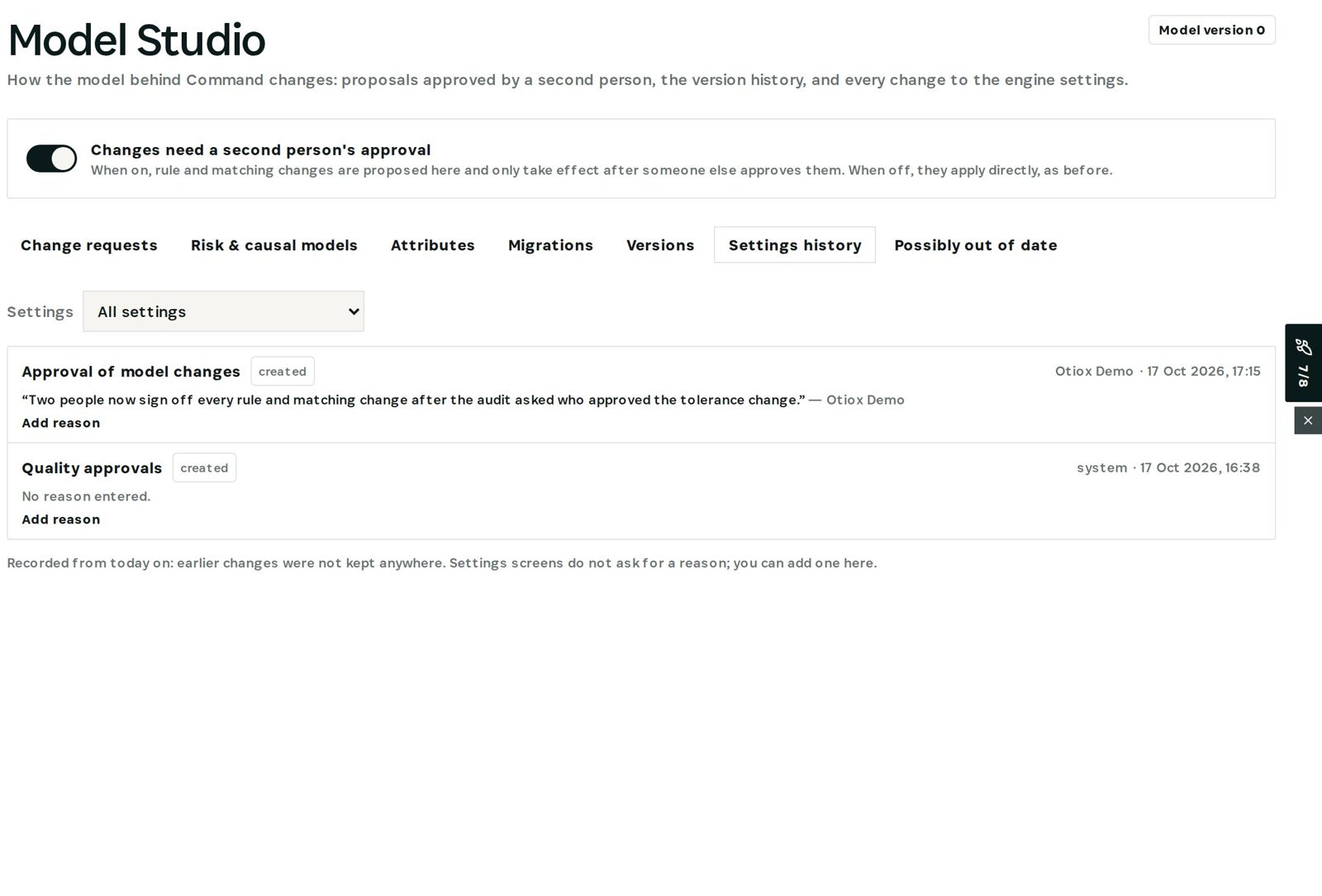
Every change to the integrity and predictive engines, detector thresholds, inventory, auto-assembly, approval rules and matching tolerances appears field by field, with who and when. Settings screens do not ask for a reason, so Add reason keeps it here — in the demo: *two people now sign off every rule and matching change after the audit asked who approved the tolerance change.*
Why it matters
Every finding, prediction and decision in Otiox records the model version in force. So when a result changes, you can tell whether the business changed — or the settings did.
What you have at the end
- Every settings change on record, with its reason.
- No control loosened by one person alone.
- Results traceable to the model version that produced them.
Screenshots come from the Otiox demo workspace. Choose Switch to demo in the sidebar to follow along; changes there never touch live data. Command reads your records and never changes them.