Playbook: the shop shows one price, the books another
The situation
In the demo workspace, SmartSensor S100 Pro costs 189 in your records. The price was raised, but the connected Shopify store still shows 169. Customers order at 169, the invoice follows the order, and the margin report calculates with 189. Every shop order earns 20 less than you think, and nobody sees it until someone compares invoices by hand.
KitStarter Bundle is the same problem from the other side: a promotion at 249 was never switched off, while your records say 289.
Before you start
- The shop must be connected (Shopify or WooCommerce) and its products linked to your records. Products that are not linked are not compared; they wait for review on the same screen.
- The check only reads. Nothing changes in Otiox or in the shop.
Step 1 — Check the shop's prices
Open Command → Identity & Matching.
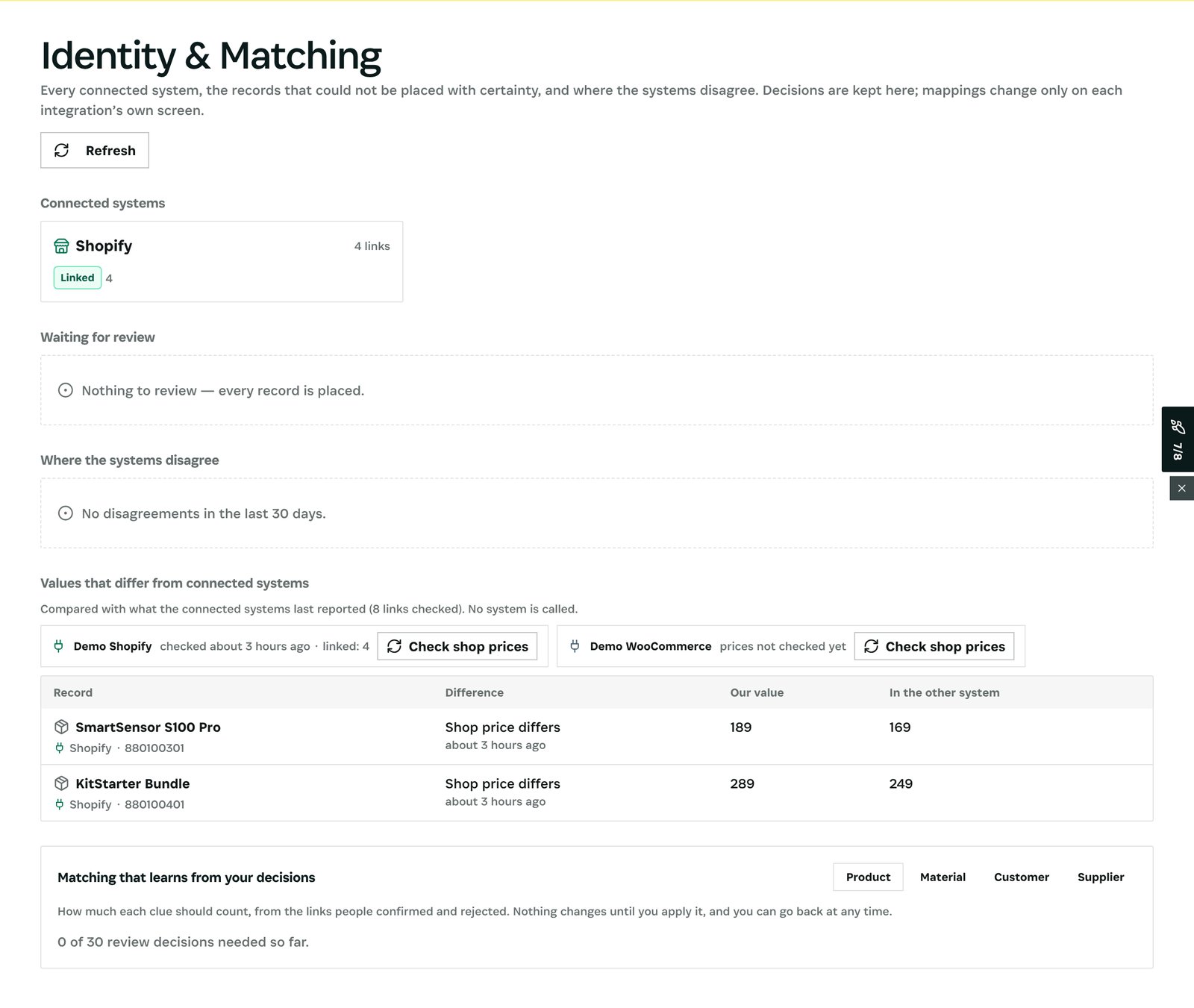
At the top are the connected systems and their links (Shopify, four linked products). Below is Values that differ from connected systems, with a Check shop prices button for each shop.
What happens when you press it: Otiox asks the shop for the current price of every linked product and stores the reading with its time. Earlier readings are kept, so you can always see what the shop showed before. Next to the shop you see when it was last checked and how many products are linked.
Step 2 — Read the differences
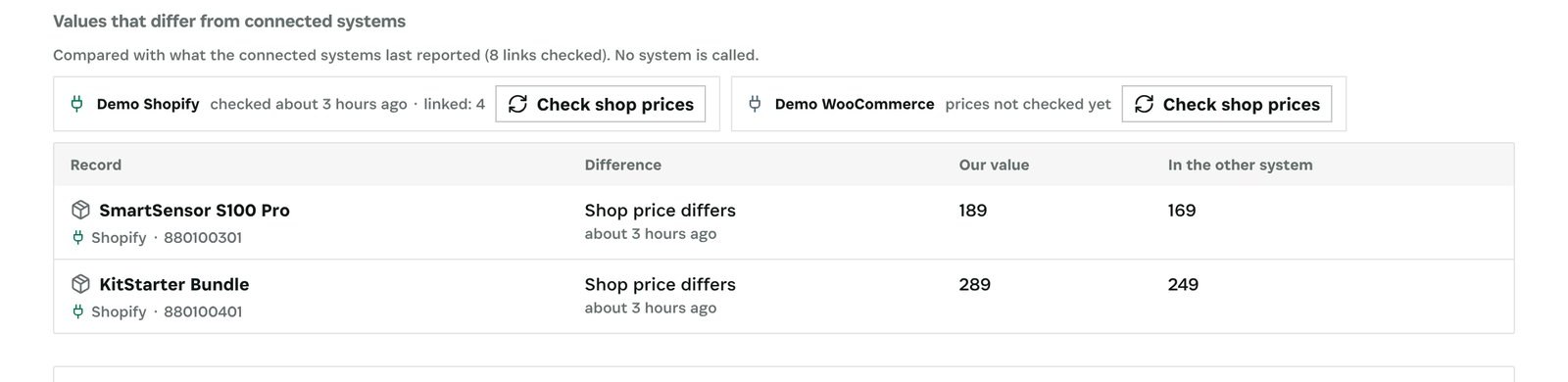
Each row is one product: its name, the shop and the external ID, what differs, our value and the value in the other system. In the demo every linked product was checked, and two disagree:
| Product | In your records | In the shop | Difference per unit |
|---|---|---|---|
| SmartSensor S100 Pro | 189 | 169 | −20 |
| KitStarter Bundle | 289 | 249 | −40 |
MotorDriver MD-12 and Cable Set CS-1 match, so they are not listed.
Under each difference Otiox also says who overwrites whom. If the connection sends prices to the shop, the difference is temporary: the shop takes your price on its next product update. If it does not (as in the demo shop), the difference stays until someone corrects it.
Step 3 — Decide which price is right
Each row has two ways out:
- Your records are right. Correct the price in the shop, or turn on price sync in the integration settings and edit the product so the new price is sent.
- The shop is right (for example, the promotion is intended). Set that price on the product in Otiox so margin reports use the price customers actually pay.
After
- Press Check shop prices again. A row disappears once both values agree.
- Orders already sold at the old price stay as they are. If the gap was large, review them in the margin-by-customer report.
What you have at the end
- One list of every product whose price differs between the shop and your records, with both values.
- For each difference, whether it will correct itself or stay.
- A history of shop price readings for any later question about what the shop showed.
Screenshots come from the Otiox demo workspace. Choose Switch to demo in the sidebar to follow along; changes there never touch live data. Command reads your records and never changes them.